Magic Particle
Use Magic Particle when particles emitted by a Magic Action should turn Unity Particle System collisions into UCC impacts, such as a Fire Wand spray that damages what its embers touch.
Choose a particle or a projectile
Magic Particle reports collisions; it does not move, aim, home, deal damage, or end the visual by itself.
| Intended result | Recommended setup |
|---|---|
| Several emitted particles can each touch a target | Particle System, Magic Particle, and Particle Pooler, spawned by the Magic Action’s Cast Effects Spawn Particle module. The Particle System owns movement and collision. |
| One fireball follows a physical trajectory and produces one precise impact | Projectile with its required trajectory setup, spawned by Cast Effects Spawn Projectile. Let Projectile own collision and leave Magic Particle Collisions disabled unless a second particle-driven impact is deliberate. |
| A burst, glow, beam, or trail is visual only | Cast Effects Spawn Particle without Magic Particle, and keep the Collision module or Send Collision Messages disabled. |
For targeting, select Forward, Target, or Indicate on the Magic Action’s Caster. That controls the cast data and the spawned root’s orientation while the Cast Effect is active; Magic Particle does not steer individual particles toward a target. Use Projectile or project-specific movement when the object itself needs trajectory or homing behavior.
Create a collision particle prefab
- Open Tools > Opsive > Ultimate Character Controller > Object Manager.
- Enter a Name, select Particle for Object Type, enable Magic Particle Collisions, and select Build Object. The released Version 3 manager does not list a separate Magic Particle object type.
- Save the prefab, then confirm its root has Particle System, Particle Pooler, and Magic Particle. In the inspected Version 3.2.0 builder, the Particle path adds Particle Pooler and optional Magic Particle but does not add Particle System; add that required component manually when it is absent.
- Configure the Particle System’s Main, Emission, Shape, movement, Renderer, and lifetime for the intended Fire Wand effect.
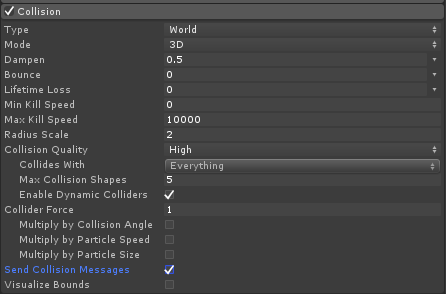
- Enable the Particle System Collision module. Choose the appropriate world collision mode and Collides With layers, then enable Send Collision Messages. Magic Particle cannot receive
OnParticleCollisionwithout both the module and that option. - Configure the particle collision response. For a one-hit ember, make the particle stop or lose its remaining lifetime on contact. For an area stream, decide intentionally how often a continuing particle may report a collision.
- Leave Can Collide With Originator disabled for a normal weapon. Also exclude the character’s layers in Collides With when self-collision must be impossible.
- Keep Particle Pooler on the prefab. Use a non-looping Particle System or make sure the Magic Action stops a looping one so it can return to the object pool.

The Unity Particle System Collision module determines which scene colliders produce these messages. Magic Particle adds UCC impact handling after Unity reports a collision.
Connect a Fire Wand
- Create or select the Character Item’s Magic Action. Add an enabled Trigger, a Simple Caster, and valid first- and third-person Cast Origin transforms as described in Magic.
- For a look-directed spray, set Simple Caster Direction to Forward and keep Use Look Source enabled.
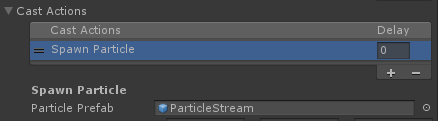
- In Cast Effects Module Group, add Spawn Particle. Assign the collision-particle prefab to Particle Prefab.
- Tune Position Offset and Rotation Offset at the wand tip. Leave Parent To Origin disabled when emitted particles should remain in world space after the character moves. Choose Particle System Simulation Space to match that result.
- Leave Particle Layer at its default Ignore Raycast unless the spawned visual itself must occupy another layer. This setting changes the spawned hierarchy’s GameObject layer; the Particle System’s Collides With mask still decides which targets particles can hit.
- In Impact Module Group, add Generic Magic Impact Module. Configure its Conditions and successful Impact Actions. The default action group contains Simple Damage, Spawn Surface Effect, and Impact Event.
- Set Simple Damage > Damage Amount, and select a Surface Impact on Spawn Surface Effect when the Surface System should create target-specific feedback. These values belong to the Magic Impact module, not Magic Particle. For a physics push, prefer Projectile or a custom Impact Action because the Magic Particle path leaves impact strength at zero in Version 3.2.0.
- Save the Character Item and prefab, then verify that the Magic Action’s ID matches the character’s Use ability Action ID.

Editor checkpoint
Before entering Play Mode, confirm that:
- the prefab has Particle System, Particle Pooler, and Magic Particle on the same root;
- Collision and Send Collision Messages are enabled, with deliberate Collides With layers;
- the Particle System’s speed, lifetime, simulation space, looping, and collision lifetime behavior match the spell;
- the Cast Effects Spawn Particle row references this prefab and the cast origin is the wand tip;
- one or more enabled Magic Impact modules contain the intended damage, force, surface, event, or custom actions;
- self-collision is excluded unless it is a tested feature; and
- either Magic Particle or Projectile owns a collision result, rather than both responding to the same visible fireball.
Choose the important settings
Magic Particle has one serialized option:
| Setting | Version 3 default | Behavior |
|---|---|---|
| Can Collide With Originator | Disabled | Ignore a collision when Unity reports the casting character’s Ultimate Character Locomotion GameObject as the target. Layer filtering is the safer additional guard for child-collider character setups. |
The Cast Effects Spawn Particle module controls how the prefab enters the scene:
| Setting | Version 3 default | Choose it based on |
|---|---|---|
| Particle Prefab | None | The pooled prefab containing the particle setup. |
| Position Offset / Rotation Offset | Zero | Alignment relative to the current perspective’s cast origin. |
| Parent To Origin | Disabled | Whether the particle root follows the cast origin. Emitted particle behavior also depends on Simulation Space. |
| Project Direction On Plane | Disabled | Whether to remove the character-up component from the cast direction. |
| Clear Parent On Stop | Disabled | Whether a parented particle root becomes independent before the cast stops emitting. |
| Set Renderer Length Scale | Disabled | Stretch a compatible Particle System renderer to the cast target distance; useful for a beam, not a normal ember spray. |
| Particle Layer | Ignore Raycast | The layer applied recursively to the spawned hierarchy. |
| Fade In Duration / Fade Out Duration | 0 |
Optional material-alpha transitions. The material color property defaults to _TintColor. |
| Delay / Initial Delay | 0 / -1 |
Cast Effect timing. -1 makes the first cast use Delay. Repeats require a Caster that keeps updating the cast. |
Particle velocity, gravity, lifetime, size, simulation space, and collision response remain Particle System settings. Magic Particle has no movement speed, targeting, collision mask, damage, impact limit, or lifespan fields.
A newly added Generic Magic Impact Module starts with one target-condition check, an empty failure group, and this successful action group:
| Impact Action | Important Version 3 defaults | Magic Particle result |
|---|---|---|
| Simple Damage | Damage Amount 10, Impact Force 2, Impact Force Frames 15, Impact Radius 0, Scale Damage By Impact Strength disabled |
Applies the base damage to a damage target. Magic Particle leaves Impact Strength at 0, so its standard force is zero; enabling damage scaling would also reduce damage to zero. |
| Spawn Surface Effect | Use Context Data enabled; local Surface Impact None | Assign the local Surface Impact because this collision path does not supply Impact Damage Data. Placement uses Magic Particle’s reconstructed raycast. |
| Impact Event | Source and target callbacks enabled | Sends OnObjectImpact to the particle source and impacted target. |
Keep Scale Damage By Impact Strength disabled for this component unless an earlier custom action explicitly assigns a nonzero strength.
How it runs
- Cast Effects Spawn Particle obtains the prefab from
ObjectPoolBase, positions and rotates it from the Caster data, applies Particle Layer, clears the Particle System, and initializes Magic Particle with the active Magic Action and cast ID. - Unity simulates the particles. The Particle System Collision module decides which collisions generate
OnParticleCollisionmessages. - Magic Particle rejects the reported originator when Can Collide With Originator is disabled, finds a non-trigger Collider on the reported GameObject, and reconstructs a
RaycastHitfrom the particle-system root toward that object. MagicAction.PerformImpactrecords the particle root as the source GameObject, the casting character in the impact context’s fallback owner data, and the cast ID as the impact source ID. Every enabled Magic Impact module receives the context.- Generic Magic Impact evaluates its conditions, then invokes the successful or failed Impact Action group. Simple Damage can affect Health, Spawn Surface Effect uses the reconstructed hit, and Impact Event can notify listeners. The Magic Particle path does not assign Impact Strength, so the default Simple Damage force is zero.
- When the particle GameObject is disabled, Magic Particle resets each enabled Magic Impact module for that cast ID.
- Particle Pooler waits for the Particle System to stop being alive, then returns the GameObject through the local or active network object pool. A looping system remains alive until another owner stops it.
Magic Particle does not stop a particle after collision and does not suppress repeated callbacks. A particle that continues colliding can perform the Magic Impact group again. Use the Particle System collision response, an Impact Condition, or a Projectile workflow to enforce the intended hit count.
Verify in Play Mode
- Equip the Fire Wand, expand the Magic Action’s Debug view, and cast at a Health target on an included collision layer.
- Confirm particles begin at the correct first-person or third-person wand tip, travel in the expected simulation space, and do not collide with the caster.
- Confirm one particle collision enters the enabled Magic Impact modules and produces the configured damage, surface response, and impact event. If the design requires push force, verify the custom action or Projectile path that supplies it.
- Cast at scenery without Health. Confirm the surface response occurs and no damage error is produced.
- Cast several particles into one target. Confirm the observed number of impacts matches the spell design; change collision lifetime or conditions if a continuing particle applies damage repeatedly.
- Test a miss. Non-looping particles should finish and the prefab should become inactive through Particle Pooler.
- Stop or interrupt the cast and switch perspectives. Confirm no looping particle remains attached to the old origin and the next cast initializes cleanly.
- If using a physical fireball instead, repeat with Spawn Projectile and verify that Projectile alone owns the collision and lifespan.
- In multiplayer, repeat as owner, server, and remote observer. Confirm only the authoritative path applies gameplay impacts and every role cleans up the visual.
Troubleshooting
| Symptom | Check | Fix |
|---|---|---|
| The Console says the Magic Projectile has no Particle System. | The Version 3.2.0 Object Manager Particle path may have created Particle Pooler without Particle System. | Add Particle System to the prefab root before Play Mode. |
| The Console says Collision or Send Collision Messages is disabled. | Particle System Collision and Send Collision Messages are required by Magic Particle. | Enable both and configure Collides With. |
| Particles are visible but impacts never run. | The prefab may be spawned as ordinary scenery, the Cast Effect may not have initialized Magic Particle, or no Magic Impact module is enabled. | Spawn it through Magic Cast Effects Spawn Particle, or call Initialize from custom code, then enable the intended Impact module. |
| Particles do not move or move with the wand unexpectedly. | Magic Particle has no movement. Check Particle System velocity, lifetime, Simulation Space, and Parent To Origin. | Configure motion in the Particle System or use a Projectile for trajectory-driven movement. |
| The spell hits its caster. | Can Collide With Originator only filters the GameObject Unity reports when it resolves directly to the caster’s locomotion object. | Also exclude the character layers from Particle System Collides With, especially for child colliders. |
| One particle damages the same target repeatedly. | The particle remains alive and Unity continues sending collision messages; Magic Particle does not end it or deduplicate callbacks. Generic Magic Impact forces its Impact Actions, so Allow Multi Hits does not suppress these callbacks. | Stop or kill the particle on collision, add an Impact Condition/custom hit guard, or use one Projectile impact. |
| Impact Force is nonzero but the target is not pushed. | MagicAction.PerformImpact initializes this collision context with Impact Strength 0, and Simple Damage multiplies force by that value. |
Use Projectile or a custom Impact Action that assigns a deliberate strength before applying force. |
| Damage becomes zero after enabling strength scaling. | Scale Damage By Impact Strength also multiplies damage by the zero strength on this path. | Keep the option disabled or assign strength in project code before Simple Damage runs. |
| A physical fireball damages twice. | Both Projectile collision and Magic Particle collision may be reporting the same encounter. | Choose one collision owner. For a normal Spawn Projectile fireball, disable Magic Particle Collisions. |
| Surface feedback appears at an unexpected point. | Version 3.2.0 reconstructs a raycast from the Particle System root rather than reading the individual particle’s collision event position. | Keep particles tightly aligned with the root or use Projectile/custom collision-event processing when exact hit position and normal matter. |
| The prefab never returns to the pool. | The Particle System may be looping or remain alive in a child. | Stop every looping system and allow all child particles to die; Particle Pooler waits while IsAlive(true) remains true. |
| A collision with a child or unusual collider does nothing. | Magic Particle searches the reported GameObject’s Colliders and skips triggers before reconstructing a raycast on that GameObject’s layer. | Put a non-trigger Collider on the reported target object or use Projectile/custom collision handling for complex hierarchies. |
| Remote players produce duplicate damage or stale particles. | Magic Particle itself does not decide authority. | Let the multiplayer integration own Magic Cast Effect and Impact replication, and do not independently execute gameplay impacts on observers. |
| Damage, scoring, or kill credit has no attacker. | In Version 3.2.0, Magic Particle is not an IDamageSource, and default Simple Damage replaces its prepared fallback source with SourceComponent as IDamageSource, which is null for this component. |
Use Projectile for source-preserving impacts, add a project IDamageSource component to the particle root, or use a custom Impact Action that keeps the context’s DamageSource. |
| A combined spell uses damage or surface data from a different effect. | The Magic Particle PerformImpact overload does not assign or clear the reused context’s ImpactDamageData; a previous projectile-style effect can leave data there. |
Use separate Magic Actions for unlike impact data or clear and populate the context in a custom collision path before running Impact modules. |
Related pages
- Magic configures the Caster, Cast Effects, Impact modules, timing, and networking flow.
- Object Manager creates the starting particle or projectile prefab.
- Projectile is the better collision owner for a single moving fireball.
- Impact Actions configure damage, force, surface effects, and callbacks.
- Impact Action Conditions filter which targets receive an impact.
- Health configures damage and Shield reception.
- Surface Impacts map an impact to surface-specific effects.
- Events explains UCC event registration and cleanup.
Developer reference
MagicParticle.Initialize(MagicAction magicAction, uint castID) is the required runtime handoff. Cast Effects Spawn Particle and Spawn Projectile call it automatically when the spawned root contains Magic Particle. A custom spawner must call it before collision messages arrive. OnParticleCollision(GameObject other) is the Unity callback that reconstructs a hit and calls MagicAction.PerformImpact.
Magic Particle exposes no public property for Can Collide With Originator in the inspected Version 3.2.0 source. Subclass the component or configure the serialized field on the prefab rather than expecting a runtime property.
The source does not call ParticleSystem.GetCollisionEvents; it reconstructs one raycast using the Particle System root and the reported target. That is adequate for a simple, aligned effect but is not an exact per-particle collision position or normal. It also does not destroy the particle, impose a hit limit, or provide targeting.
MagicAction.PerformImpact(uint, GameObject, GameObject, RaycastHit) resets the reused ImpactCollisionData but does not assign ImpactStrength, leaving it at 0. The standard Simple Damage action multiplies force by that value. It also multiplies damage by the same value when Scale Damage By Impact Strength is enabled. A project action must assign strength before those calculations when either scaled result is required.
That overload also neither assigns nor clears MagicImpactCallbackContext.ImpactDamageData. It is normally null for a particle-only spell, so Simple Damage and Spawn Surface Effect use their local values. If another Cast Effect previously supplied Impact Damage Data through the same Magic Action, the reused context can retain it; custom code should explicitly clear or replace that data.
Version 3.2.0 prepares fallback owner data for a Magic Particle impact, but the default Simple Damage action subsequently assigns DamageData.DamageSource from ImpactCollisionData.SourceComponent. Magic Particle does not implement IDamageSource, so that assignment is null unless another source component is supplied. Projects that require reliable attacker or kill attribution should use the Projectile path, add a source component, or customize damage processing.
Prefab and Magic Action settings serialize normally, but an active cast ID, initialized Magic Action reference, live particles, scheduled pool check, and Impact module runtime state are transient. Finish or cancel the spell around a save/load boundary rather than expecting an in-flight particle stream to resume.
With the multiplayer integration enabled, Magic Action exposes Cast Effect and Impact replication calls, and Particle Pooler uses NetworkObjectPool.Destroy while network pooling is active. Authority, spawning, impact replication, and object registration remain integration responsibilities; custom spawning is not synchronized automatically.