The object systems provide reusable prefabs and components for pickups, projectiles, explosions, magic effects, damage rules, and detected scene targets. Start here when gameplay needs an object outside the character, then follow the route for the behavior that object must perform.
Choose the object behavior
| Goal | Start with | What it covers |
|---|---|---|
| Build a supported gameplay prefab | Object Manager | Creates a configured starting prefab for pickups, projectiles, shells, grenades, explosions, magic projectiles, particles, and several weapon effects. |
| Give the character health or inventory objects | Object Pickup | Explains the shared pickup behavior and routes to Health Pickup and Item Pickup. |
| Launch, throw, bounce, or preview an object’s path | Trajectory Object | Provides the shared trajectory simulation and routes to Projectile, Grenade, Magic Projectile, and Shell. |
| Apply area damage and force | Explosions | Configures a radius-based effect that can damage targets and push supported physics objects. |
| Turn particle collisions into magic impacts | Magic Particle | Connects Particle System collision messages to the Magic Action that cast the effect. |
| Let an ability recognize a particular scene target | Object Identifier | Assigns a numeric ID that Detect Object Ability Base abilities can use as a filter. |
| Change how damage is calculated | Damage Processor | Defines the rule between a damage source and target, including integration with an external stats or modifier system. |
These pages describe different responsibilities. For example, a grenade can use a Trajectory Object for flight, spawn an Explosion at the end, and let a Damage Processor modify the resulting damage.
Build a supported prefab
Use the Object Manager when its Object Type list contains the result you need:
- Open Tools > Opsive > Ultimate Character Controller > Object Manager.
- Enter a Name and choose an Object Type.
- Assign a GameObject when the selected type requests one. Use the model or visual object that should become the prefab, not an already configured Character Item for an Item Pickup.
- For Magic Projectile or Particle, enable Magic Particle Collisions only when particle collisions should perform Magic Action impacts.
- Select Build Object and save the prefab under the project’s
Assetsfolder. - Open the new prefab and complete the feature-specific configuration using the route in the table above.
- Assign the prefab to the item action, spawner, scene object, or other system that will create or enable it.
The Object Manager adds the common components, colliders, layers, and starting values for the selected type. It does not choose project-specific item definitions, effects, damage rules, layer masks, or references for you.
Common scenarios
A health or item pickup
Choose Health Pickup or Item Pickup in Object Manager, then follow Object Pickup. Decide whether pickup happens on trigger entry, what the character receives, whether the object respawns, and which message or audio confirms collection.
A projectile or throwable object
Choose Projectile, Grenade, or Shell, then follow Trajectory Object and its concrete child page. Match the collider and impact layers to the physical object, and connect the resulting prefab to the appropriate item action. A visible trajectory preview is optional and uses the same motion settings as the launched object.
A projectile that explodes
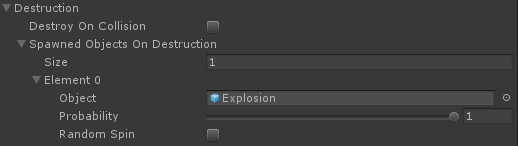
Treat flight and detonation as separate responsibilities. Configure the projectile or grenade through Trajectory Object, create the area effect through Explosions, and assign the Explosion prefab where the launched object handles destruction or impact.
A magic particle that reacts on contact
Use Magic Particle when individual Particle System collisions should invoke the casting Magic Action’s impact. The Particle System must have its Collision module and Send Collision Messages enabled, and the particle must be initialized by the Magic Action that spawned it.
A target that only certain abilities detect
Add Object Identifier to the scene target and give it an ID. Configure the Detect Object Ability Base ability with the same Object ID when it should ignore otherwise detectable objects with different IDs.
Project-specific damage rules
Use Damage Processor when the normal damage amount must pass through armor, attributes, difficulty, teams, or another modifier system. Keep movement, collision, and visual effects on their normal components; the processor owns only the damage calculation and delivery rule.
Verify in Play Mode
- Trigger the system that creates or enables the prefab rather than dragging an unconnected prefab into an unrelated scene test.
- Confirm that the expected trigger or collision occurs on the intended layers.
- Watch for one concrete result: the pickup changes the character, the trajectory follows its configured path, the explosion affects an in-range target, the magic particle performs its impact, or the ability accepts only the matching object ID.
- Reuse or respawn the object when that is part of the scenario and confirm that it initializes correctly again.
- Check the Console. Missing component references, invalid particle collision setup, or an unassigned feature prefab should be corrected before tuning values.
Troubleshooting
| Symptom | Check | Fix |
|---|---|---|
| Build Object is disabled. | Name is blank, or the selected type requires a GameObject that has not been assigned. For Item Pickup, the source object may already contain a Character Item. | Enter a name, assign the required visual GameObject, and use an item model rather than an already built Character Item. |
| The prefab was created but never appears in gameplay. | The Object Manager builds the asset but does not assign it to an item action, spawner, or scene reference. | Assign the generated prefab to the system that should create it, then test that complete workflow. |
| A collision produces no pickup, impact, or explosion. | The required trigger, Rigidbody, layer mask, or Particle System collision message is missing or excludes the target. | Follow the concrete feature page and verify its collider and layer requirements before changing effect values. |
| The object moves correctly but applies the wrong result. | Flight, impact, and damage are configured by separate systems. | Keep Trajectory Object responsible for motion, the impact or Explosion responsible for the hit effect, and Damage Processor responsible for modifying damage. |
| An ability detects the wrong scene object. | Its layer mask is broad and its Object ID remains -1, which disables ID filtering, or the value does not match the target’s Object Identifier. |
Set a deliberate Object Identifier ID and use the same Object ID on the detecting ability. |
Related pages
Developer orientation
The Object Manager is editor-only prefab scaffolding. Runtime behavior comes from the generated components and the system that initializes, spawns, or enables the prefab.
The main runtime types are divided by responsibility:
TrajectoryObjectimplementsIForceObject,IDamageSource, andISmoothedObjectfor simulated flight, forces, impacts, and trajectory previews.ExplosionimplementsIDamageSourceand sends its configured impact data and actions to objects inside its radius.ObjectPickupis the abstractIObjectPickupbase used by concrete health and item pickups.MagicParticlereceives Particle System collision callbacks after aMagicActioninitializes it.ObjectIdentifierexposes auint IDfor ability and object-reference matching.DamageProcessoris a ScriptableObject that processesDamageDatafor anIDamageTarget;DamageProcessorModuleprovides a character-level assignment point.