A Damage Processor changes or rejects damage between a source and an IDamageTarget. Use one when a firearm, melee weapon, projectile, or explosion must account for armor, resistance, difficulty, teams, or an external stat system before the target’s Health applies the result.

The built-in DamageProcessor.Default does not change the data: it calls target.Damage(damageData). Ultimate Character Controller Version 3 does not include separate armor, resistance, or team processor types. Those rules belong in a project-specific DamageProcessor subclass.

Choose where the processor applies

Scope Configure Best for
Every compatible hit from one character Add Damage Processor Module to the attacking character and assign Default Damage Processor. One team, difficulty, or stat rule shared by that character’s weapons and nested damage sources.
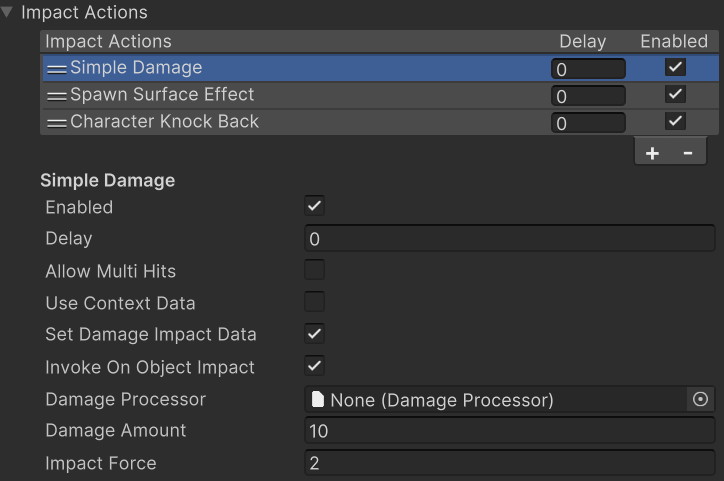
One Impact Action Assign Damage Processor on Simple Damage. A weapon or attack that needs a different rule from the character default.
Projectile or Explosion context Assign Damage Processor in the source’s Impact Damage Data, then enable Use Context Data on Simple Damage. A processor that should travel with the damage amount and force supplied by the source.
Normal UCC damage Leave every processor field empty. The runtime-created default processor passes the data directly to the target.

The module belongs on the source character, not on the object receiving damage.

Damage Processor Module on an attacking character with Default Damage Processor assigned

Assign an attack-specific asset directly on its Simple Damage Impact Action when that attack must override the character rule.

Simple Damage Impact Action with a weapon-specific Damage Processor assigned

There is no registration list or processor stack. Exactly one processor is selected for a Simple Damage invocation, in this order:

  1. Start with the Damage Processor on Simple Damage.
  2. If Use Context Data is enabled and ImpactDamageData exists, use its processor instead. A blank context value also replaces the local value, so selection continues to the fallbacks.
  3. If the selected value is empty and the source character has Damage Processor Module, use Default Damage Processor from that component.
  4. If it is still empty, use DamageProcessor.Default.

An explicitly selected processor still passes through DamageProcessorModule.ProcessDamage, but it is not replaced by the module default.

Configure the damage source

After the project contains a custom processor class:

  1. Create its ScriptableObject asset from the Assets > Create menu path declared by that class.
  2. Decide whether the rule belongs to an attacking character, one Simple Damage action, or the source’s Impact Damage Data.
  3. Assign the asset in only the intended location. When using context data, verify Use Context Data on Simple Damage.
  4. Confirm the target has Health, Character Health, or another component that implements IDamageTarget.
  5. Test the same known damage amount with the processor assigned and unassigned before adding more rules.

These released-Version-3 defaults are useful when checking the Inspector:

Location Field Default
Damage Processor Module Default Damage Processor None
Simple Damage Use Context Data Off
Simple Damage Damage Processor None
Simple Damage Damage Amount 10
Simple Damage Impact Force 2
Simple Damage Impact Force Frames 15
Simple Damage Impact Radius 0
Simple Damage Scale Damage By Impact Strength Off
Impact Damage Data Damage Processor None

How damage runs

A standard weapon or object impact follows this path:

  1. The source creates an ImpactCallbackContext. Its ImpactCollisionData identifies the hit, source, target, direction, strength, and colliders; optional ImpactDamageData carries configured damage, force, radius, and processor values.
  2. The ordered Impact Action Group reaches Simple Damage. That action reads either its local values or the context values and optionally scales damage by Impact Strength.
  3. A struck item shield can absorb damage through ShieldCollider before a processor runs.
  4. Simple Damage resolves an IDamageTarget, builds a temporary DamageData, and selects one processor using the fallback order above.
  5. The processor changes the request, rejects it, or calls target.Damage(damageData). The default processor calls the target once without changing the data.
  6. The built-in Health target rejects invalid requests, applies a qualifying hitbox multiplier, consumes its Shield attribute, consumes Health, applies force, sends damage events, and invokes death behavior when neither value remains above its minimum.

This order matters. A held shield acts before the processor; Health hitbox multipliers and the Health Shield Attribute act after it. A custom processor that returns without calling target.Damage suppresses Health changes, force, Health events, and death. A processor should normally call the target no more than once.

Choose the rule by outcome

Armor or resistance

Read the target’s external armor or resistance value, modify DamageData.Amount, clamp the result to the range your game supports, then pass it to the target. Do not duplicate Health’s hitbox or Shield Attribute logic unless the custom design deliberately replaces those systems.

For a firearm, compare one unarmored and one armored target with the same shot. For an Iron Sword, also strike every configured Health hitbox so the processor rule and hitbox multiplier can be verified separately.

Teams and friendly fire

Use DamageData.DamageSource to identify the source and the processor’s target argument to identify the receiver. IDamageSource can form an owner chain such as character -> item action -> projectile -> explosion; DamageSourceUtility.GetRootOwner() returns the outer owner for a normal, non-null chain.

Ask the project’s team or faction system whether the root source owner may damage target.Owner. Return without calling the target when friendly fire is disabled. UCC’s core Version 3 package does not provide a team database or a built-in team comparison.

Projectiles and explosions

A projectile can carry its Impact Damage Data into the hit context. Keep Use Context Data enabled on the receiving Simple Damage action when its amount, force, radius, and processor should come from the projectile.

For an Explosion, assign the processor on the Explosion component’s serialized Impact Damage Data. Enable Scale Damage By Impact Strength on Simple Damage when damage, rather than only force, should use the Explosion’s distance-based impact strength.

In released Version 3, Explosion.Explode(IImpactDamageData, ...) uses the supplied data for its overlap layer mask but sends the component’s serialized Impact Damage Data to the Impact Action callback. A processor or amount supplied only through that runtime argument therefore does not reach Simple Damage. Configure the component data, or use project code that constructs and invokes the intended impact context.

Editor checkpoint

Before entering Play Mode, confirm that:

  • the custom ScriptableObject asset is assigned at the intended scope;
  • Use Context Data agrees with the location that owns the processor and damage values;
  • the attacking character, rather than the receiver, owns Damage Processor Module when a character-wide fallback is required;
  • the receiver resolves to one IDamageTarget and has valid Health/Shield attributes when using Health;
  • the processor is stateless or stores per-character state in another component or system, because one ScriptableObject asset can serve many attackers at once;
  • a custom impact source component implements IDamageSource and supplies the intended owner chain; and
  • an Explosion that needs a custom processor has it in the component’s serialized Impact Damage Data.

Verify in Play Mode

Use one target with known Health, one with a Shield attribute, one armored target, and two characters on the same team.

Test Expected result
Fire the weapon with no processor assigned The default processor passes the configured amount to Health.
Assign a character-level multiplier processor Compatible firearm and melee hits from that character use the changed amount.
Assign a different processor on one Simple Damage action That action uses its explicit processor; the character default still applies to other unassigned actions.
Enable context data and assign a projectile processor The projectile’s context processor wins over the local Simple Damage field.
Hit an armored and unarmored target Only the armored target applies the external resistance rule, followed by its normal Health hitbox and Shield processing.
Hit an ally with friendly fire disabled Health, force, Health damage events, and death do not run for the rejected request.
Hit a target with a held shield and a Health Shield attribute The held shield adjusts the amount before the processor; the Health Shield attribute consumes the processed remainder.
Detonate an Explosion at two distances Force follows impact strength; damage follows it only when Scale Damage By Impact Strength is enabled. Both hits use the serialized Explosion processor.
Apply lethal processed damage Health sends its damage events, then death behavior and OnDeath run once.

Temporarily log the source root, target owner, incoming amount, outgoing amount, and chosen processor while validating an external stat or team integration. Remove per-hit logging after the rule is proven.

Troubleshooting and released-Version-3 limitations

Symptom Check Fix
A processor assigned on Simple Damage never runs Use Context Data may be enabled while a context exists with a different or blank processor. Assign the processor in Impact Damage Data, or disable context use so the local field is read.
The character default is ignored for one weapon That Simple Damage action or its context may select an explicit processor. Clear the explicit value when the character module should be the fallback.
The processor changes Amount, but Health does not change The processor may not call the target, or Health may reject zero damage, invincibility, an already-dead target, or spawn grace. Call target.Damage(damageData) exactly once for an accepted request and verify the Health state.
A custom team rule cannot find its target through DamageData.DamageTarget Built-in DamageData.SetDamage overloads do not assign that property, and DamageData.Copy does not copy it. Use the IDamageTarget target argument supplied to DamageProcessor.Process. Explicitly populate the property only in a fully owned custom pipeline.
DamageData.UserData contains an unexpected object Built-in SetDamage overloads do not initialize or clear User Data, and standard Simple Damage uses pooled DamageData. Set or clear UserData for every custom request that uses it. Never treat an unset pooled value as meaningful.
A custom impact has a null DamageSource Simple Damage replaces the initially resolved source with ImpactCollisionData.SourceComponent as IDamageSource. Make the custom source component implement IDamageSource and configure its owner/source chain. Standard Usable Action, Trajectory Object, Projectile, and Explosion sources already do this.
A runtime Explosion argument uses the wrong processor or amount The released overload forwards serialized component data to the Impact Action callback. Configure the Explosion component’s Impact Damage Data, or invoke a project-owned context with the intended data.
The processor applies its rule twice More than one target call or more than one Impact Action may own damage. Keep one damage owner and call target.Damage once. A Damage Processor is not a processor chain.
Remote players calculate a different result The custom rule may be running on more than one peer or depend on data not carried by the network health interface. Run the result on the authoritative combat path and synchronize the resulting Health state through the installed multiplayer integration.

Do not retain DamageData, ImpactCallbackContext, or their pooled nested data after the synchronous call. Copy only the primitive or project-owned values that must outlive the hit.

Save and multiplayer boundaries

A Damage Processor asset is configuration, not saved combat state. Persist armor, resistance, faction membership, difficulty, and other mutable values through the system that owns them. Health and inventory save support is separate from the processor and must be configured in the chosen save integration.

The UCC core package defines INetworkHealthMonitor, but a networking integration supplies the transport. On a networked Health component, only the authority forwards the accepted request through that monitor. Its damage method carries amount, position, direction, force magnitude, frames, radius, IDamageSource, and hit collider; it does not carry DamageData.UserData, DamageTarget, or ImpactContext. Make the processor’s authoritative result reproducible from synchronized data, or explicitly replicate any additional project-owned result.

Developer reference

Create a custom processor

Derive a ScriptableObject from DamageProcessor and override Process. This example applies a nonnegative multiplier and then delegates to the target:

using Opsive.UltimateCharacterController.Traits.Damage;
using UnityEngine;

[CreateAssetMenu(
    fileName = "MultiplierDamageProcessor",
    menuName = "Ultimate Character Controller/Damage Processors/Multiplier Damage Processor")]
public sealed class MultiplierDamageProcessor : DamageProcessor
{
    [SerializeField, Min(0)] private float m_Multiplier = 1;

    public override void Process(IDamageTarget target, DamageData damageData)
    {
        if (target == null || damageData == null) {
            return;
        }

        damageData.Amount = Mathf.Max(0, damageData.Amount * m_Multiplier);
        if (damageData.Amount > 0) {
            target.Damage(damageData);
        }
    }
}

Returning before the target call is the normal way to reject a hit. Calling the target with an amount of 0 does not preserve force or events because the built-in Health target rejects zero-damage requests.

Runtime data contracts

DamageData contains:

  • DamageSource, an IDamageSource with Owner Damage Source, Source Owner, Source GameObject, and Source Component semantics;
  • DamageTarget, which custom callers may set but the standard built-in population path does not;
  • Amount, Position, Direction, ForceMagnitude, Frames, and Radius;
  • HitCollider;
  • ImpactContext, which exposes the originating ImpactCallbackContext; and
  • UserData, an untyped project extension slot.

The current IDamageTarget contract exposes Owner, HitGameObject, Invincible, Damage, IsAlive, and Heal. Use the target argument as the authoritative target for the current call.

An ImpactCallbackContext contains the owning CharacterItemAction when one exists, required ImpactCollisionData, and optional IImpactDamageData. Collision data includes source ID, detection layers, raycast hit, impact position/object/Rigidbody/collider/direction/strength, damage source and target, source component/GameObject/character/item action, hit count/colliders, and surface impact. Use that detail only when the processor is intentionally coupled to an item impact; ordinary Health.Damage calls may have no impact context.

There is no processor-specific event. The processor decides whether to enter the target pipeline; the built-in Health component then sends OnHealthDamage, OnHealthDamageWithData, and, for a lethal result, OnDeath. See Health for the exact event timing and signatures.