
First Person
The First Person view type is an abstract view type that will move the camera in the direction of the input mapped to the camera.The view type uses the spring system to allow for bobs, sways, shakes, and reaction to external forces.If the attached character has a humanoid then the view type will follow along with the local delta changes of the neck.This will prevent the camera from looking on the inside of the character model.
First Person Camera
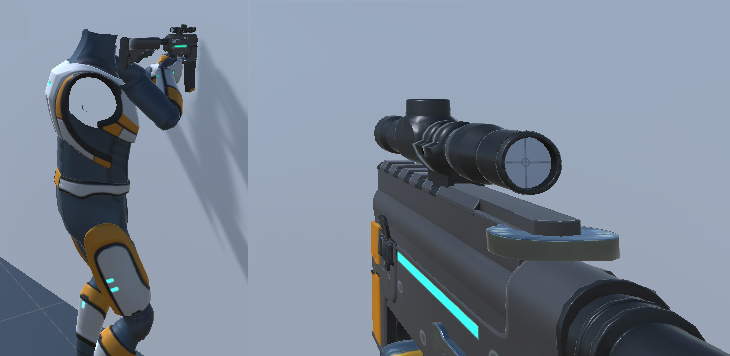
With a single camera in a first person view it’s possible for the character’s hands and items to clip the object in front of them.Consider the following screenshot which shows a character standing in front of a wall with the assault rifle equipped.
The common solution for this is to add a second camera that just renders the hands and items (the Overlay layer in the Ultimate Character Locomotion). With this solution the objects will no longer clip the wall:
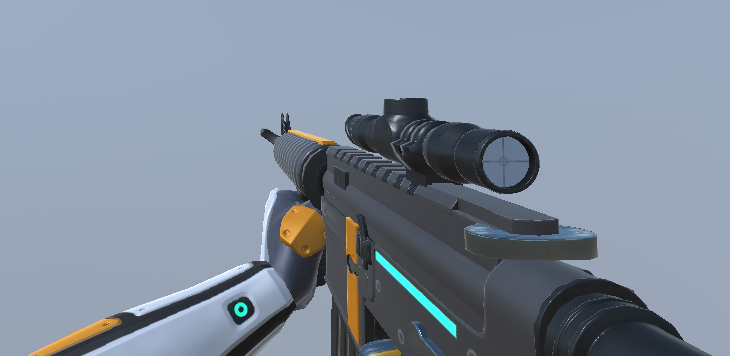
When a first person view type is added to the Camera Controller it will automatically add the first person camera if the camera does not already exist.This camera will be added as a child to the main camera and have the correct values set for the camera’s render settings.
A second camera is not needed if you are using the universal render pipeline – see this page for more details.
Head Bob
When the character is idle or moving the First Person View Type will play a bobbing animation based on the Shake Speed and Shake Amplitude. If you notice bobbing only while the character is moving this is likely caused by the Smooth Head Offset Steps field. See the details below for a in-depth description of this field.
Inspected Fields
Look Direction Distance
The distance that the character should look ahead.
Look Offset
The offset between the anchor and the camera.
Look Down Offset
Amount to adjust the camera position by when the character is looking down. This will prevent the camera from clipping the character’s body mesh.
Culling Mask
The culling mask of the camera.
Field Of View
The field of view of the main camera.
Field Of View Damping
The damping time of the field of view angle when changed.
First Person Position Offset
Specifies the position offset from the camera that the first person objects should render.
First Person Rotation Offset
Specifies the rotation offset from the camera that the first person objects should render.
Object Overlay Render Type
Specifies how the overlay objects are rendered. This field is only shown if the lightweight or universal render pipelines are imported.
- Second Camera: Use a second stacked camera to ensure the overlay objects do no clip with any other objects.
- Render Pipeline: Use the URP/HDRP render pipeline to ensure the overlay objects do no clip with any other objects.
- None: No special rendering for the overlay objects.
Use First Person Camera
Should the first person camera be used? The first person camera may not want to be used if the first person objects (arms/items) should intersect with scene objects, such as for an interact animation. This field is shown if the lightweight and universal render pipelines are not imported.
First Person Camera
A reference to the first person camera.This camera will render the items/character hands to prevent clipping with overlapping objects.
First Person Culling Mask
The culling mask of the first person camera.
Synchronize Field Of View
Should the first person camera’s field of view be synchronized with the main camera?
First Person Field Of View
Specifies the field of view for the first person camera.
First Person Field Of View Damping
The damping time of the field of view angle when changed.
Position Lower Vertical Limit
A vertical limit intended to prevent the camera from intersecting with the character.
Position Fall Impact
Determines how much the camera will be pushed down when the player falls onto a surface.
Position Fall Impact Softness
The number of frames that the fall impact force should be applied.
Rotation Strafe Roll
Rotates the camera depending on the sideways local velocity of the character, resulting in the camera leaning into or away from its sideways movement direction.
Rotation Fall Impact
Determines how much the camera will roll when the player falls onto a surface.
Rotation Fall Impact Softness
The number of frames that the fall impact force should be applied.
Position Spring
The positional spring used for regular movement.
Rotation Spring
The rotational spring used for regular movement.
Secondary Position Spring
The positional spring which returns to equilibrium after a small amount of time (for recoil).
Secondary Rotation Spring
The rotational spring which returns to equilibrium after a small amount of time(for recoil).
Min Pitch Limit
The minimum pitch angle(in degrees).
Max Pitch Limit
The maximum pitch angle(in degrees)
Bob Positional Rate
The rate that the camera changes its position while the character is moving.
Bob Positional Amplitude
The strength of the positional camera bob.Determines how far the camera swings in each respective direction.
Bob Roll Rate
The rate that the camera changes its roll rotation value while the character is moving.
Bob Roll Amplitude
The strength of the roll within the camera bob. Determines how far the camera tilts from left to right.
Bob Input Velocity Scale
This tweaking feature is useful if the bob motion gets out of hand after changing character velocity.
Bob Max Input Velocity
A cap on the velocity value from the bob function, preventing the camera from flipping out when the character travels at excessive speeds.
Bob Min Through Vertical Offset
A trough should only occur when the bob vertical offset is less then the specified value.
Bob Trough Force
The amount of force to add when the bob has reached its lowest point.This can be used to add a shaking effect to the camera to mimick a giant walking.
Bob Require Ground Contact
Determines whether the bob should stay in effect only when the character is on the ground.
Shake Speed
The speed that the camera should shake.
Shake Amplitude
The strength of the shake.Determines how much the camera will tilt.
Smooth Head Offset Steps
If the character is a humanoid the First Person View Type will follow the character’s head position. This prevents the camera from seeing inside the character’s model when the character has a different vertical height (such as if the character is crouching). This head tracking will also give a slight bob as the character is moving. You can disable the head tracking completely by setting the Smooth Head Offset Steps field to 0. This field specifies the number of head positions the camera remembers when determining the head position. The larger the value to more positions will be remembered which gives a smoother result.
Collision Radius
The radius of the camera’s collision sphere to prevent it from clipping with other objects.
Rotate With Head
Should the camera rotate as the character’s head rotates?
Vertical Offset Lerp Speed
The speed at which the camera moves to the target VerticalOffset. This is only used when the character does not have a head bone.