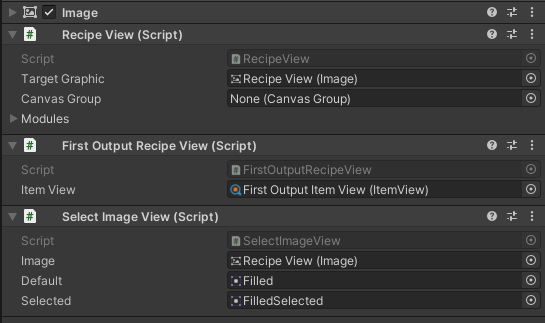
Recipe View
A Recipe View presents one Crafting Recipe in a recipe grid. Use it to give each recipe a consistent tile, such as a Health Potion icon, while the Crafting Menu handles selection, quantity, ingredient checks, and the craft action.
The released Version 1 type is Recipe View. Some asset-menu labels and older source names still say Recipe Box, including Category Recipe Box Set; those names refer to the same recipe-tile workflow.
Before you begin
Prepare the following in the active Inventory System Database:
- a Consumable Recipes Crafting Category;
- a Brew Health Potion recipe that consumes 2 Herb and 1 Water and outputs 1 Health Potion;
- a Crafter that exposes that recipe through Crafting Categories or Miscellaneous Recipes; and
- a player Inventory whose main Item Collection is Bag.
Create a Crafting Menu from Tools > Opsive > Ultimate Inventory System > UI Designer > Crafting. Its Crafting Recipe Grid supplies each recipe to a Recipe View; the view does not find recipes or an Inventory by itself.
Understand the recipe presentation
| Part | Responsibility |
|---|---|
| Recipe View | Holds the current Crafting Recipe and updates its View Modules. |
| First Output Recipe View | Sends the first Item Amount from the recipe’s Default Output to a nested Item View. |
| Crafting Recipe View Drawer | Chooses and creates the Recipe View prefab used by a grid slot. |
| Category Recipe View Set | Maps Crafting Categories to Recipe View prefabs and provides an empty view. |
| Crafting Recipe Grid | Draws the Crafter’s recipes and reports selection or clicks. |
| Recipe Panel | Shows the selected recipe’s full result, ingredients, descriptions, and optional Currency cost. |
| Quantity Picker Panel | Changes the requested amount and enables the craft action only when the processor accepts that quantity. |
A compact Recipe View and a detailed Recipe Panel solve different problems. The tile helps the player choose a recipe; the panel explains what the selected recipe consumes and produces.
Configure the Recipe View
- Select the Recipe View prefab used by the Crafting Recipe Grid. The Classic and RPG UI Designer schemas include one, or you can duplicate the schema-owned prefab before customizing it.
- On Recipe View, assign Target Graphic when the tile needs a selectable visual target and Canvas Group when the whole tile should fade as the View changes state.
- Keep the Modules list synchronized with the View Module components on the prefab. Version 1 retrieves attached modules during initialization, and the UI Designer also refreshes the list when editing a View.
- Add or select First Output Recipe View and assign its Item View reference.
- Configure that nested Item View with the modules needed for the output, such as icon, name, or amount.

First Output Recipe View displays only the first direct Item Amount in the recipe’s Default Output. Make Health Potion that first output for the sample tile. A recipe without a direct Item Amount output logs a warning and cannot provide a value to this module.
Map recipe categories to prefabs
Use one mapping when every recipe shares a tile, or map categories when recipes need different layouts.
- Create or select a Category Recipe View Set. In Version 1, the create menu is Create > Ultimate Inventory System > UI > Category Recipe Box Set.
- Assign Empty Recipe View for an empty grid slot.
- Add an entry to Categories Recipe Views, select Consumable Recipes under Category, and assign the Recipe View prefab under Item View Prefab. The last label is retained from the older Inspector even though this field expects a recipe view.
- Use a null-category entry as the fallback for recipes that do not match a more specific mapping.
- On the grid’s Crafting Recipe View Drawer, assign this asset to Category Item View Set. This released Inspector label is also inherited legacy wording; the field accepts a Category Recipe View Set.
Every mapped prefab must contain a View that accepts a Crafting Recipe. Otherwise, the drawer returns an invalid view and Version 1 logs a warning.
Connect the selected-recipe details
Open the generated menu in the UI Designer Crafting tab and confirm these relationships:
- Crafter includes Consumable Recipes and uses the intended Crafting Processor.
- Crafting Recipe Grid uses the Recipe View drawer and category mapping configured above.
- Recipe Panel has a result Item View for Health Potion and at least two Ingredient Items entries for Herb and Water.
- Total Craft Cost is assigned only when the recipe processor uses Currency ingredients.
- Quantity Picker Panel is assigned on the Crafting Menu.
The Recipe Panel’s ingredient list is a fixed set of presentations. Provide at least one entry for every ingredient that the selected recipe must display. The panel multiplies ingredient, result, and Currency amounts by the selected quantity.
Choose selection, quantity, and status behavior
The Recipe View displays the recipe, but the surrounding menu owns interaction and availability:
- Draw Recipes On Open, enabled by default, redraws the Crafter’s current recipe list whenever the menu opens.
- Selecting a grid entry updates the Recipe Panel. Clicking it also opens the Quantity Picker Panel when Open Quantity Picker Panel On Recipe Click is enabled, which is the default.
- The quantity starts at 1. Each change asks the Crafter’s processor whether that amount can be crafted, updates the Recipe Panel, and disables the confirm action when the check fails.
- A Currency ingredient can be shown by Total Craft Cost; the Recipe Panel changes the cost color when the bound Inventory cannot afford it.
- On Craft Complete receives a Boolean success result after a craft attempt. Use that event for feedback that belongs outside the recipe tile.
There is no built-in craftable-status field on RecipeView or FirstOutputRecipeView. Add a custom View Module only when the tile itself must show availability; otherwise, keep status in the Recipe Panel and quantity confirmation flow.
Editor checkpoint
Before entering Play Mode, confirm that:
- the Recipe View prefab contains Recipe View and First Output Recipe View;
- First Output Recipe View > Item View references a configured nested Item View;
- Brew Health Potion’s first Default Output Item Amount is 1 Health Potion;
- the Category Recipe View Set maps Consumable Recipes to that prefab and has an Empty Recipe View;
- the Crafting Recipe View Drawer references the intended set;
- the Crafting Menu references its Crafter, Crafting Recipe Grid, Recipe Panel, and Quantity Picker Panel;
- the Crafter exposes Brew Health Potion exactly once; and
- the Recipe Panel has two ingredient presentations plus a Health Potion result presentation.
The visible checkpoint is one Brew Health Potion tile in the recipe grid and, when selected in the editor hierarchy, a Recipe View whose module points to its nested Item View.
Verify in Play Mode
- Put 1 Herb and 1 Water in Bag, open the Crafting Menu, and confirm that the Brew Health Potion tile shows the Health Potion output.
- Select the tile. Confirm that the Recipe Panel shows 2 Herb, 1 Water, and 1 Health Potion while the craft action remains unavailable.
- Add a second Herb and click the tile. Confirm that the quantity picker opens at 1 and enables Craft.
- Craft once. Verify that exactly 2 Herb and 1 Water leave Bag, 1 Health Potion enters Bag, and On Craft Complete reports success.
- Add 4 Herb and 2 Water, choose quantity 2, and verify that the panel previews 4 Herb, 2 Water, and 2 Health Potions before crafting.
- Increase the quantity beyond the available ingredients. Confirm that the preview updates but the craft action becomes unavailable.
- Clear or filter out the selection and confirm that the empty Recipe View and cleared Recipe Panel do not retain another recipe’s details.
Troubleshooting
| Symptom | Check | Fix |
|---|---|---|
| The recipe grid is empty | The Crafting Menu’s Crafter, Crafting Categories, Miscellaneous Recipes, active database, and Draw Recipes On Open. | Assign the intended Crafter and expose Brew Health Potion once from the active database. |
| A recipe slot uses the wrong layout | The Category Recipe View Set entries and the drawer’s Category Item View Set assignment. | Map Consumable Recipes to the intended prefab and keep a null-category fallback only for unmatched recipes. |
| Empty slots log a warning | Empty Recipe View is not assigned. | Assign a valid empty prefab to the Category Recipe View Set. |
| The tile is blank | First Output Recipe View > Item View or Brew Health Potion’s Default Output. | Assign the nested Item View and make Health Potion the first direct Item Amount output. |
| The tile retains an earlier output after changing recipes | The new recipe has no direct Item Amount in Default Output. | Correct the recipe output; the Version 1 module warns and returns without replacing the nested Item View value in this case. |
| The selected recipe has missing ingredients or descriptions | Recipe Panel > Ingredient Items has fewer entries than the recipe needs. | Add one Item View and description entry for Herb and another for Water. |
| Clicking does not open a quantity choice | Open Quantity Picker Panel On Recipe Click or Quantity Picker Panel. | Enable the setting and assign the generated panel. |
| Craft stays unavailable with enough items | The bound Inventory, processor, ingredient collections, and exact recipe amounts. | Bind the player’s Bag and configure the processor to search the collection that holds Herb and Water. |
| A custom tile never shows availability | The logic was added to the Recipe View, but no custom View Module updates it. | Keep availability in the standard quantity flow or implement a module that receives and refreshes that state. |
Related pages
- Views
- Item View
- Crafting Menu runtime workflow
- Crafting UI Designer
- Crafting Category editor
- Crafting Recipe editor
- Crafting concepts and processors
- Custom Crafting Processors
Developer and lifecycle details
RecipeView is a View<CraftingRecipe>. Calling SetValue forwards the recipe to its modules; Clear clears their presentation. FirstOutputRecipeView.SetValue reads recipe.DefaultOutput.ItemAmounts[0] and sends that Item Amount to its nested Item View with no Inventory origin.
CraftingRecipeViewDrawer.GetViewPrefabFor asks its CategoryRecipeViewSet for the prefab. The Crafting Menu calls SetCrafter and DrawRecipes when a station changes the available recipe set; selection and click callbacks update the Recipe Panel and quantity flow. OnCraftComplete exposes only the success Boolean, while the virtual OnCraftComplete method also receives the full Crafting Result, recipe, Inventory, and quantity.
Recipe Views, selected recipes, quantities, and open-panel state are presentation state and are not saved by the view. A successful craft changes the Inventory immediately, so an Inventory saver can persist the resulting Herb, Water, and Health Potion amounts. Version 1 does not replicate Recipe View selection or craft commands; multiplayer code must validate the craft on the authoritative side and synchronize the resulting Inventory changes.