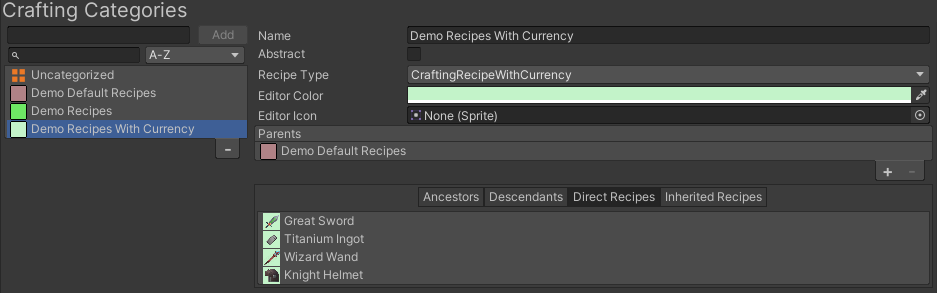
Crafting Category
Create a Crafting Category to group recipes that should appear together and use the same Crafting Recipe type. Start with one concrete category for the first recipe; split categories only when the player-facing grouping or processing data is meaningfully different.
Create the starter category
- Open Tools > Opsive > Ultimate Inventory System > Main Manager.
- In Setup, confirm that the intended Inventory System Database is selected.
- Open Crafting Categories.
- Enter Consumable Recipes beside Add and create it.
- In Properties, keep Abstract disabled so Crafting Recipes can select this category directly.
- Set Recipe Type to the built-in base Crafting Recipe type for the standard Health Potion recipe.
- Choose a Color that makes this group recognizable in the editor.
- Leave Parents empty for this first standalone category.
The database also retains an Uncategorized Crafting Category as a safe default. New Crafting Recipes use it until a project category is assigned; move finished recipes out of Uncategorized before runtime verification.

Choose category settings
| Setting | Use it for | Standard decision |
|---|---|---|
| Name | The unique category and Scriptable Object name. | Consumable Recipes |
| Abstract | A grouping category that should not be selectable directly by a Crafting Recipe. | Disabled for the concrete starter category |
| Color | An editor-only visual aid for a larger recipe list. | One consistent color for consumable recipes |
| Recipe Type | The Crafting Recipe class used by direct recipes in this category. | The built-in base type for the simple Health Potion recipe |
| Parents | A higher-level recipe grouping when the hierarchy adds useful navigation. | None for the first standalone category |
The selected Recipe Type must inherit from the base Crafting Recipe type. Use a custom type only when recipes need additional serialized fields or different data, and pair it with a compatible Crafting Processor.
Decide when to split categories
Keep recipes together when they:
- use the same Recipe Type and processor expectations;
- should appear in the same player-facing list or tab; and
- have the same broad purpose.
For the standard sample, place the recipe that produces Health Potion in Consumable Recipes. Add more categories later only for a clear reason. For example, a Weapon Upgrades category can be separate if Iron Sword or Fire Wand upgrade recipes need different fields, a different Recipe Type, or a distinct menu group.
Do not create one category per recipe. The Crafting Recipe already represents the individual input and output data.
Right-click a Crafting Category row and choose Duplicate when a new group should start with the same abstract flag, Recipe Type, and parents. Existing Recipes remain assigned to the original Category; the duplicate is a new identity. Set its editor color and icon separately and populate it deliberately.
Use abstract parents deliberately
Add a parent category when several concrete groups need a shared place in the hierarchy. Mark a parent Abstract when recipes should select only its concrete descendants.
After changing Parents, use Relationships to inspect:
- Ancestors for the selected category’s parent chain;
- Descendants for its child categories;
- Direct Crafting Recipes assigned to this category; and
- Inherited Crafting Recipes supplied through the hierarchy.
Avoid a parent relationship that would make a category one of its own descendants. Keep the hierarchy shallow unless the extra level improves editor or runtime organization.
Connect the category to the Health Potion recipe
- Open Crafting Recipes and create the Health Potion recipe.
- Set its Category to Consumable Recipes rather than Uncategorized.
- For the base Recipe Type, use existing Item Definitions for the ingredient entries and set Health Potion as the output.
- Review the recipe’s visual summary and confirm that its inputs and output are correct.
Assigning a Crafting Category converts the recipe to that category’s Recipe Type. Changing a recipe to a category with a different type can remove fields that do not exist on the new type, so settle the category and type before entering substantial custom data.
Connect the category to the Crafter and menu
The Crafter owns a Crafting Processor and the list of recipes available to the Crafting Menu. Add Consumable Recipes to the Crafter’s Crafting Categories list so its recipes are available. Use Miscellaneous Recipes only for individual recipes that should be included outside the category lists.
Create or edit the Crafting Menu from the UI Designer Crafting tab. Confirm that the menu uses the intended player Inventory and the Crafter configured with Consumable Recipes. The recipe grid should then be able to list the Health Potion recipe, while the Recipe Panel shows its ingredients and output.
Editor checkpoint
Before entering Play Mode, confirm that:
- Consumable Recipes exists in the intended database and is not Abstract.
- Its Recipe Type is the built-in base type used by the Health Potion recipe.
- The Health Potion recipe uses Consumable Recipes rather than Uncategorized.
- Direct Crafting Recipes lists the Health Potion recipe.
- The recipe visual summary shows the intended Item Definition inputs and Health Potion output.
- The Crafter includes Consumable Recipes in Crafting Categories.
- The Crafting Menu references the intended Inventory and Crafter.
Verify in the Crafting Menu
- Enter Play Mode and open the Crafting Menu.
- Confirm that the Health Potion recipe appears in the recipe grid under the intended grouping.
- Select it and confirm that the Recipe Panel shows the correct ingredients, output, and quantity controls.
- With insufficient ingredients, attempt to craft and confirm that no ingredients are removed and no Health Potion is added.
- Add the required ingredients to the player Inventory and craft once.
- Confirm that the processor removes the configured inputs and adds the expected Health Potion output.
Troubleshooting
- Consumable Recipes cannot be selected on a recipe: Check whether Abstract is enabled. Disable it for a concrete category.
- A custom Recipe Type does not appear: Confirm that the type compiles and inherits from the base Crafting Recipe type.
- Recipe fields disappear after changing Category: The new category uses a different Recipe Type. Restore the intended category or re-enter only the fields supported by the new type.
- The Health Potion recipe is missing from Relationships: Check that its direct Category is Consumable Recipes rather than Uncategorized or another group.
- The recipe is absent from the Crafting Menu: Check the Crafter’s Crafting Categories and Miscellaneous Recipes, then confirm that the menu references that Crafter.
- Crafting does not consume or produce Items: Check the recipe inputs and output, the player’s Inventory, and the Crafting Processor selected by the Crafter.
- Unexpected recipes appear through a parent: Inspect Direct Crafting Recipes, Inherited Crafting Recipes, and the category ancestry, then simplify the parent structure or adjust the Crafter grouping.