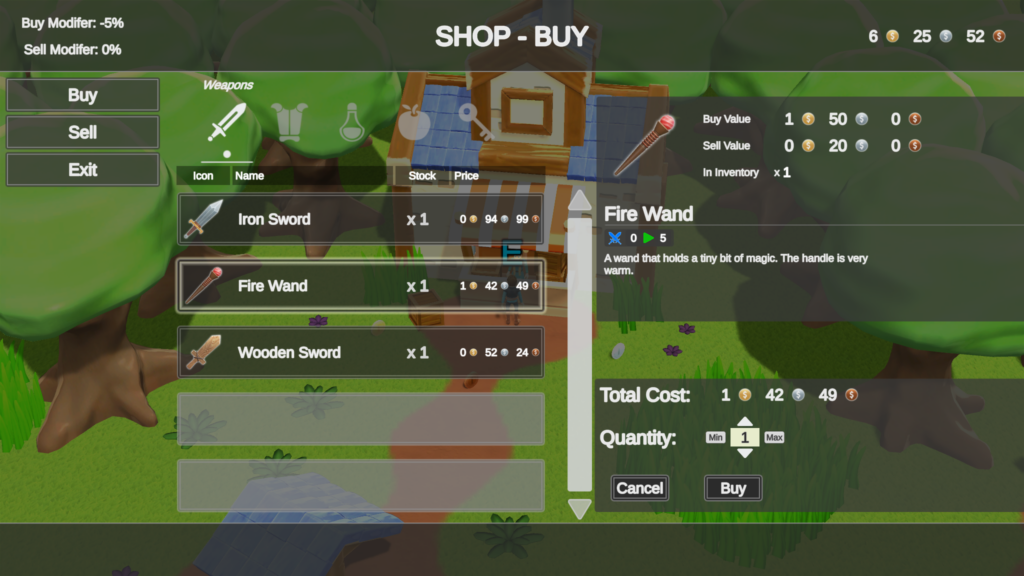
Use the UI Designer Shop tab to generate and connect the scene hierarchy for a Shop Menu. This page stops at the editor handoff; Shop Menu owns runtime pricing, stock, transactions, events, and Play Mode troubleshooting.
Before you begin
Prepare the data and scene objects that the generated menu will reference:
- select the intended Inventory System Database in Main Manager > Setup;
- create Gold and give the player Inventory a Currency Owner;
- in the Item Categories editor, declare
BuyPriceas aCurrencyAmountsItem Definition attribute on the appropriate shared or direct category, then set the inherited Gold value on Health Potion and Iron Sword; - add
SellPricewhen the menu supports selling; - give the Shop its own Inventory containing the Items that should appear for sale; and
- create Canvas Managers, duplicate a UI Designer schema, and spawn it in the scene.
Attribute lookup is case-sensitive. BuyPrice on an Item and Buy Attribute Name on Shop must match exactly.
Create the Shop Menu
- Open Tools > Opsive > Ultimate Inventory System > UI Designer.
- Select Shop, then open Create.
- Set Parent Transform to the Rect Transform that should contain the menu.
- Set Panel Option:
- Basic creates a standalone panel.
- Main Menu creates a Shop inner panel. Its parent must be the generated Main Menu content transform.
- Select Create.
- Open Edit and select the new Shop Menu. Use Find Available Targets in Scene when it is not listed.
- Under Shop, add or assign the Shop component and its Shop Inventory.
- Under Inventory Grid, create or select the grid that will display Shop stock and player Items.
- Under Currency Displays, create Total Price UI. It displays the selected transaction total, not the player’s balance.
- Under Quantity Picker Panel, create the quantity control.

Use the UI Designer Currency tab to add a separate Currency Owner Monitor when the menu should also show the player’s current Gold.
Check the generated references
The generated hierarchy should contain these connected parts:
| Part | Editor responsibility |
|---|---|
| Shop Menu | Owns Buy/Sell mode, Item selection, and the quantity flow. |
| Shop | Supplies stock, attribute names, modifiers, and transaction rules. |
| Inventory Grid | Shows Shop Inventory in Buy mode and player Inventory in Sell mode. |
| Total Price | Maps every accepted Currency, including Gold, to a Currency View. |
| Quantity Picker Panel | Chooses and confirms the transaction amount. |
| Currency Owner Monitor | Optionally shows the player’s balance separately from Total Price. |
Keep Bind To Panel Owner Inventory enabled when the Display Panel Manager‘s Panel Owner is the player. Otherwise, deliberately assign Inventory, use Bind To Inventory By Identifier, or open the menu through a Shop Menu Opener. Do not leave several competing owner routes configured.
Editor checkpoint
Before entering Play Mode, confirm that:
- the Shop Menu is under the intended Display Panel Manager or Main Menu content;
- Shop, Inventory Grid, Total Price, and Quantity Picker Panel references are assigned;
- the Shop Inventory contains Health Potion and Iron Sword;
- both Items expose
BuyPriceasCurrencyAmountscontaining Gold; - Buy Attribute Name matches
BuyPriceexactly; - Total Price maps Gold to a valid Currency View;
- the Shop Menu resolves the intended player Inventory and Currency Owner; and
- purchased Items have valid destination Item Collections.
Continue with the Shop Menu runtime workflow. Its Play Mode scenario verifies quantity totals, insufficient funds, finite stock, selling, and shared Shop Menu Openers without repeating those instructions here.
Troubleshooting
| Symptom | Check | Fix |
|---|---|---|
| The Shop tab has no target | Canvas Managers, duplicated schema, and spawned scene UI | Complete UI Designer Setup, then use Find Available Targets in Scene. |
| The generated menu is under the wrong panel | Parent Transform and Panel Option | Remove only the reviewed generated instance, choose the intended parent, and create it again. |
| A customized prefab loses references after regeneration | Whether a new generated instance replaced the project-owned prefab | Keep the project-owned prefab and reconnect it through Edit. |
| Total Price is blank | Gold mapping and the Total Price reference | Add a Currency View for Gold and restore the generated reference. |
| The balance is missing or shows the transaction total | Whether the view is Total Price or a Currency Owner Monitor | Create a separate Currency Owner Monitor for the player’s balance. |
Use Shop Menu troubleshooting after the hierarchy is connected and a transaction fails in Play Mode.