Item Transaction Collection

Use an Item Transaction Collection as a routing entry point when different Items should enter different collections through one add operation. In the shared example, an Intake collection sends Health Potion to Bag and Iron Sword to Equipment.

The transaction collection does not store routed Items. It checks its named destination collections in order, chooses the first one that can accept a nonzero Amount, and delegates the addition to that collection. Destination restrictions therefore define the route.

Configure the destinations first

Create and test the collections that will receive Items before adding the router:

  1. Configure Bag as a base Item Collection.
  2. Add an Item Collection Category Restriction that allows Consumable Items in Bag.
  3. Configure Equipment as an Item Slot Collection whose Weapon slot accepts the Weapon category.
  4. Confirm that Health Potion can enter Bag but Iron Sword cannot.
  5. Confirm that Iron Sword can enter Equipment but Health Potion cannot.

Without the Bag restriction, the base collection accepts both Items. If Bag appears first in the route, it would also receive Iron Sword and Equipment would never be checked.

See Item Restrictions and Item Slot Collection for those destination rules.

Configure the Intake collection

  1. Add an Item Collection named Intake to the Inventory.
  2. Set Collection Type to Item Transaction Collection.
  3. Set Purpose to Main, then change Bag’s Purpose to None.
  4. Under Item Collection Names, add Bag first and Equipment second.
  5. Keep Prevent Adding When No Match enabled. This is the released Version 1 default.
  6. Leave Return Real Added Item Amount disabled for the initial full-accept-or-reject workflow. It is disabled by default.
  7. Under the inherited Overflow Options, keep Return Overflow disabled, Invoke Rejected Event enabled, and Overflow Action empty until the rejection policy is deliberate.

Use exact, unique collection names. Released Version 1 does not skip a name that fails to resolve before calling the destination, so a missing or misspelled name can cause a runtime exception. Never include Intake itself in its destination list because that would recurse back into the same router.

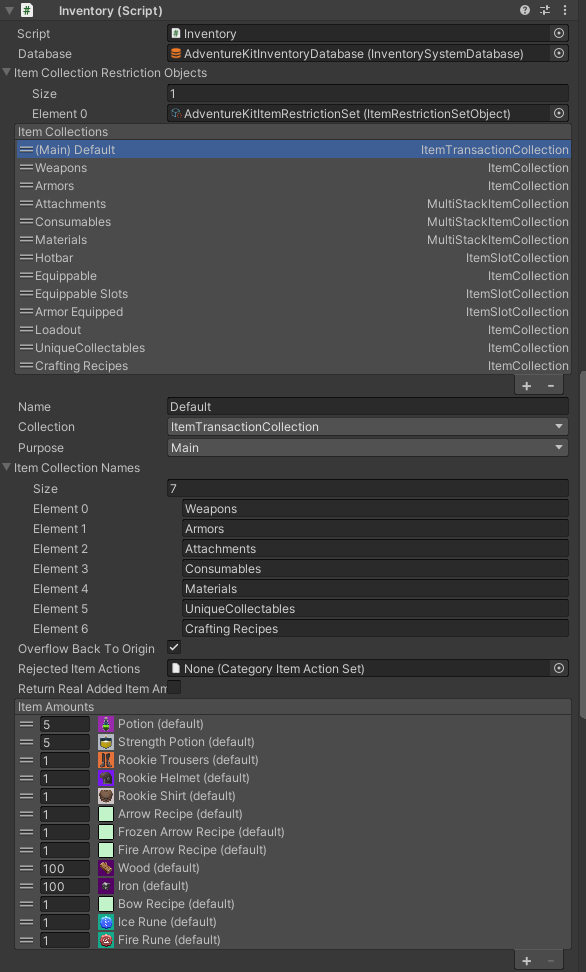
The legacy Version 1 Inventory Inspector showing a Main transaction collection named Default, seven ordered destination collection names, the older Overflow Back To Origin and Rejected Item Actions fields, Return Real Added Item Amount disabled, and a populated default Item Amounts list.

The legacy image predates the current released Version 1 field layout. Current source uses the inherited Overflow Options instead of Overflow Back To Origin and Rejected Item Actions, and adds Prevent Adding When No Match. Use the current labels described on this page.

Follow the runtime routing order

For every addition, the transaction collection:

  1. resolves each name in Item Collection Names in list order;
  2. calls that destination’s CanAddItem;
  3. selects the first result that is non-null and has a nonzero Amount;
  4. sends the full original requested Amount to that destination’s AddItem; and
  5. applies the transaction collection’s overflow behavior if the destination accepts less than requested.

The route does not continue to later destinations with a rejected remainder. If Bag says it can accept 3 of 5 Health Potion Items, Bag is selected, receives the request, and the remaining 2 go through overflow handling instead of being offered to Equipment.

The inherited base collection splits a unique Item request with an Amount greater than one into distinct unique Items. Each of those Items is routed separately.

Request Destination checks Result
3 Health Potion Bag accepts; Equipment is not checked Bag stores all 3.
1 Iron Sword Bag rejects; Equipment accepts Equipment stores the sword in its Weapon slot.
An Item accepted by neither collection Both reject With Prevent Adding When No Match enabled, the request is rejected and overflow handling runs.
5 Health Potion when Bag accepts only 3 Bag returns a partial result Bag stores 3; the other 2 are overflow, and Equipment is not checked.

The transaction collection’s own Item Stacks remain empty. Inventory and destination collection views show the actual Items.

Choose the return and no-match behavior

The two transaction-specific booleans affect what the caller sees:

Setting Default Released Version 1 behavior
Prevent Adding When No Match On CanAddItem returns null when no named destination accepts anything. The transaction reports zero added and runs its inherited overflow path.
Return Real Added Item Amount Off After a destination is selected, the transaction reports the requested Amount even when the destination accepted less. Overflow still runs for the rejected remainder.

Enable Return Real Added Item Amount only when the caller must receive the destination’s returned ItemInfo and the destination normally accepts the complete request or rejects it outright. With the default off, use Inventory events or inspect the destination when the accepted Amount matters.

Do not disable Prevent Adding When No Match for a normal router. When it is off and no destination matches, the transaction runs overflow handling but, with Return Real also off, reports the requested Amount even though no destination stored it.

Preserve or return the origin

The inherited Return Overflow option can offer a rejected remainder back to its origin when all of these are true:

  • the incoming ItemInfo retains an Item Collection source;
  • the source is not the transaction collection itself; and
  • the source can accept the rejected ItemInfo.

Adding a newly created Item by name does not provide an origin. Removing an Item from a source collection and then passing the returned ItemInfo to Intake does preserve that source reference.

The transaction creates a destination ItemInfo from only the Item and Amount, so it does not pass the source and stack references to the destination. This prevents the destination’s own Return Overflow option from returning it directly; the transaction collection handles the original source context after the destination returns.

Account for released Version 1 overflow limitations

Partial acceptance can produce more than one overflow notification for one routing request:

  1. the destination collection handles its rejected remainder;
  2. the transaction collection handles the same partial result; and
  3. with Return Real Added Item Amount enabled, inherited Item Collection code sees the partial return and can invoke the transaction overflow path again.

As a result, rejection events or Overflow Actions with side effects can run multiple times. In addition, when Return Overflow succeeds, released Version 1 replaces the returned ItemInfo Amount with the Amount accepted back by the origin; that value is not necessarily the Amount stored in the destination.

A no-match request can also run the transaction overflow path twice when Prevent Adding When No Match is disabled and Return Real Added Item Amount is enabled.

For predictable routing, prefer destination rules that fully accept or fully reject each request. If partial routing, precise returned Amounts, and side-effecting overflow actions must be combined, use a tested custom router rather than relying on the built-in transaction collection’s return value.

Editor checkpoint

Before entering Play Mode, confirm that:

  • Intake is the only collection with Purpose: Main;
  • every Item Collection Names entry resolves to a unique destination and Intake is not listed;
  • Bag appears before Equipment only because Bag rejects Weapon Items;
  • Bag and Equipment each accept the intended category and reject the other example Item;
  • Prevent Adding When No Match remains enabled;
  • Return Real Added Item Amount matches the caller’s expectations;
  • Overflow Options are configured on both the destinations and Intake with duplicate notifications in mind; and
  • no default Item Amounts were added to Intake, because it is a router rather than storage.

Verify in Play Mode

  1. Add 3 Health Potion through Inventory.AddItem. Confirm that Bag receives all 3 and Intake remains empty.
  2. Add 1 Iron Sword through the same API. Confirm that Bag rejects it and Equipment receives it.
  3. Add an Item that neither destination accepts. With Prevent Adding When No Match enabled and Return Overflow disabled, confirm that the returned Amount is zero and that the rejection listener runs.
  4. Temporarily limit Bag so only part of a Health Potion request fits. Confirm that the remainder does not fall through to Equipment.
  5. Observe rejection and overflow listeners during the partial test. Record how many notifications the selected Return Real and Overflow Options combination produces before attaching side effects.
  6. For an origin test, remove Health Potion from a source collection, pass the returned ItemInfo to Intake, and confirm the configured Return Overflow behavior.

Troubleshooting

Symptom Check Fix
Iron Sword always enters Bag Bag is unrestricted or appears before Equipment Restrict Bag to Consumable, or put a suitably restricted Equipment destination first.
Routing throws a null-reference exception Item Collection Names spelling and collection existence Correct or remove every stale name; V1 does not safely skip a missing destination.
Routing never completes Intake or another transaction collection points back to Intake Remove the recursive route and point only to storage collections.
An unmatched Item appears to have been added Prevent Adding When No Match is off and Return Real is off Re-enable Prevent Adding When No Match and retest the return value.
The caller reports more Items than the destination contains Return Real Added Item Amount is off Enable it only after testing the overflow behavior, or inspect the destination/event payload instead.
A rejected remainder is not tried in the next collection The first destination returned a nonzero partial Amount Design routes as full accept/reject, or implement a router that explicitly distributes the remainder.
Overflow Actions run twice or more A partial destination result, or no match with Prevent Adding When No Match off; then Return Real and the destination/transaction overflow settings Avoid side effects on overlapping overflow paths or use a custom router for partial transactions.
A rejected Item does not return to its source Incoming ItemInfo source and Intake Return Overflow Pass the ItemInfo returned by the source removal and enable Return Overflow on Intake.
Intake looks empty in the Inspector Whether Items reached the named destinations Inspect Bag and Equipment; Intake intentionally does not retain routed Item Stacks.

Use the Item Transaction Collection API

Use the Inventory API when Intake is Main. A newly created Item has no source collection:

var potionResult = inventory.AddItem("Health Potion", 3);
var swordResult = inventory.AddItem("Iron Sword", 1);

Preview the selected destination or preserve an origin explicitly:

var intake = inventory.GetItemCollection("Intake")
    as ItemTransactionCollection;
var bag = inventory.GetItemCollection("Bag");

var swordDefinition = InventorySystemManager.GetItemDefinition("Iron Sword");
var swordInfo = bag.GetItemInfo(swordDefinition);
if (swordInfo.HasValue) {
    var destination = intake.GetItemCollectionToTransactionTo(swordInfo.Value);

    if (destination != null) {
        var removed = bag.RemoveItem(swordInfo.Value);
        var reportedResult = intake.AddItem(removed);
    }
}

GetItemCollectionToTransactionTo runs the same ordered CanAddItem checks and exposes the selected destination. AddingToCollection contains that last selection.

Do not treat Intake as an aggregate collection. GetAllItemStacks, GetItemAmount, and the definition/category query overloads inspect its empty local stack list. GetItemInfo(Item) is the one query overridden to search the linked destinations in order, and removal with a concrete ItemInfo walks those destinations in order. Query Inventory, Bag, or Equipment when counts and complete lists matter.

Observe routing on the owning Inventory:

Event Meaning
EventNames.c_Inventory_OnAdd_ItemInfo_ItemStack A destination accepted an Item and supplies the resulting stack.
EventNames.c_Inventory_OnRejected_ItemInfo A rejected ItemInfo was reported.
EventNames.c_Inventory_OnAddItemRejected_ItemInfoToAdd_ItemInfoAdded_ItemInfoRejected Requested, accepted, and rejected values from an overflow path.
EventNames.c_Inventory_OnAddItemOverflow_ItemInfoToAdd_ItemInfoAdded_ItemInfoRejected The same three values for overflow handling.

The transaction collection does not invoke its normal add/update event when a destination stores the Item; the destination collection updates instead. Its OnItemAddOverflow callback can run when Intake handles overflow and Invoke Rejected Event is enabled.

Register and unregister matching event signatures over the same Unity lifecycle. See Events for the released Version 1 pattern.