What is a Behavior Tree?
Behavior Trees are a decision-making technique commonly used in games to select actions based on conditions and priorities. They are especially well suited for reactive AI and complex gameplay logic that must continuously adapt to changing situations.
Behavior Trees first gained widespread attention after their use in Halo 2, and they have since become a cornerstone of modern game AI. They combine ideas from several AI techniques, including hierarchical state machines, scheduling, planning, and action execution. One of their main advantages is that they are easy to understand and author using a visual editor, making complex decision logic easier to design and maintain.
Decision-Making with Tasks
At their core, Behavior Trees are built from a collection of interconnected tasks arranged in a hierarchical structure. These tasks represent both the logic that checks conditions and the actions that an agent can perform.
Some tasks perform actions such as moving, attacking, or playing an animation. Others evaluate conditions such as whether an enemy can see the player or whether a target is within range. Additional tasks control the flow of execution by determining which tasks run next based on success or failure. Formally, these are categorized as action, conditional, composite, and decorator tasks, but the key idea is that they work together to model decision-making logic.
How Behavior Trees Execute
The flow page goes into more details, but behavior trees evaluate from top to bottom and left to right, moving through tasks based on whether each task succeeds or fails. Consider a simple tree that includes the following logic:
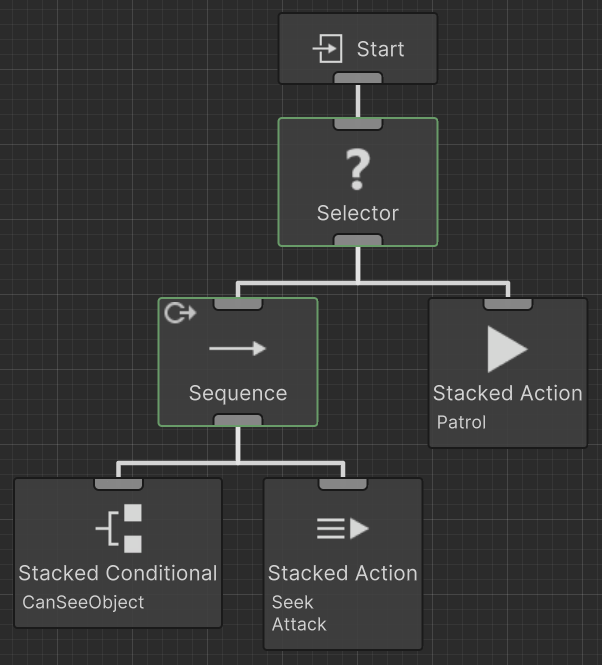
This is a simple behavior tree that packs a lot of functionality. An agent first checks whether it can see the player. If the player cannot be seen, the check fails and the tree moves to an alternative behavior, such as patrolling. If the player is seen, the tree continues into a sequence that causes the agent to seek the player and then attack.
Failure generally means “try another option,” while success allows execution to continue along the current branch. This structure allows agents to naturally prioritize behaviors and fall back to safer or simpler actions when higher-priority behaviors are not possible.
Rapid Iteration with Visual Editing
One of the biggest strengths of Behavior Trees is how naturally they map to a visual graph. Instead of writing long chains of nested conditionals, tasks can be rearranged, swapped, or extended visually. For example, if you want the agent to start seeking the player when they are within a certain distance rather than when they are visible, you can simply replace a Can See Object condition with a Within Distance condition.
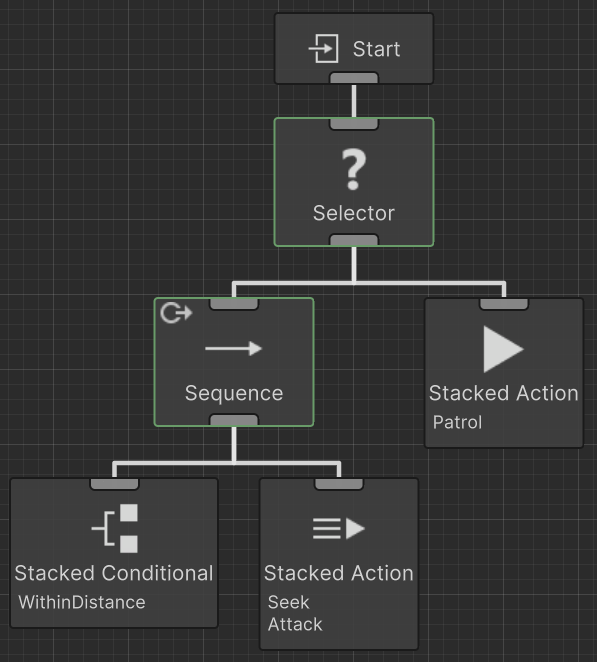
This small change instantly alters the decision logic without restructuring the entire system.
Real-Time Debugging and Inspection
Behavior trees also have an advantage during debugging – during runtime you can see the active task as well as inspect the values.
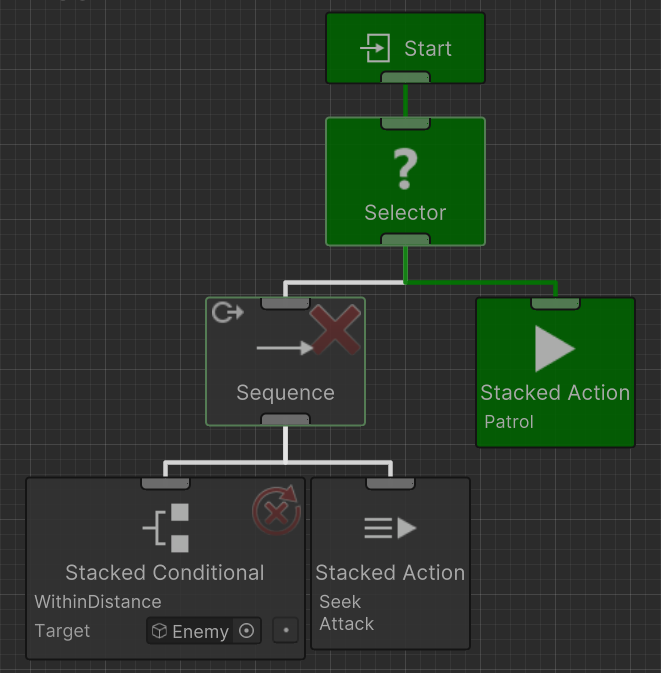
During runtime you can visually see which task is currently active, observe execution flow as it moves through the tree, and inspect or modify variable values in real time. The active task is highlighted, and each task displays its execution status, making it easy to understand exactly why a particular behavior is occurring. This visibility greatly reduces the time needed to diagnose and refine complex AI logic. The visual editor and debugger are the most prevalent advantages of behavior trees, and there are many other features that make behavior trees the cornerstone of AI.
Where Behavior Trees Excel
Behavior Trees work best for systems that require:
- Continuous decision-making
- Priority-based behavior selection
- Reactive responses to changing conditions
- Complex branching logic
They are particularly effective for AI characters that must constantly evaluate their environment and choose between multiple possible actions.
Behavior Trees with Behavior Designer Pro
Behavior Designer Pro takes all of these concepts and packages it up in an easy to use interface with a flexible API. Behavior Designer Pro also uses DOTS as its backend ensuring your AI is as efficient as possible. You do not need to be familiar with DOTS in order to get the advantages of Behavior Designer Pro. Behavior Designer Pro contains more than 15 sample scenes in order to get you started. New tasks can be created by extending from one of the task types. In addition, many videos have been created to make learning behavior trees as easy as possible.
Getting Started
When you are just getting started it is recommended that you start with this tutorial. From here you’ll be able to apply the same building blocks to create a much more advanced AI logic. The following are some more behavior tree resources: