
Node Views
Custom content can be added to the individual node view within the Behavior Designer editor. This content is added through the TaskNodeViewControl. As an example the Wait task displays a progress bar indicating how much time has elapsed:
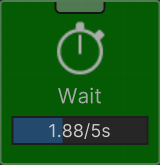 This control is drawn with the script below:
using Opsive.BehaviorDesigner.Editor.Controls.NodeViews;
using Opsive.BehaviorDesigner.Runtime;
using Opsive.BehaviorDesigner.Runtime.Components;
using Opsive.BehaviorDesigner.Runtime.Tasks.Actions;
using Opsive.GraphDesigner.Editor;
using Opsive.GraphDesigner.Editor.Events;
using Opsive.GraphDesigner.Runtime;
using Opsive.Shared.Editor.UIElements.Controls;
using Unity.Entities;
using UnityEngine;
using UnityEngine.UIElements;

[ControlType(typeof(Wait))]
public class WaitNodeViewControl : TaskNodeViewControl
{
    private BehaviorTree m_BehaviorTree;
    private ILogicNode m_Node;
    private ushort m_WaitComponentIndex = ushort.MaxValue;
    private ProgressBar m_ProgressBar;

    /// <summary>
    /// Addes the UIElements for the specified runtime node to the editor Node within the graph.
    /// </summary>
    /// <param name="graphWindow">A reference to the GraphWindow.</param>
    /// <param name="parent">The parent UIElement that should contain the node UIElements.</param>
    /// <param name="node">The node that the control represents.</param>
    public override void AddNodeView(GraphWindow graphWindow, VisualElement parent, object node)
    {
        base.AddNodeView(graphWindow, parent, node);

        if (!Application.isPlaying) {
            return;
        }

        m_BehaviorTree = graphWindow.Graph as BehaviorTree;
        m_Node = node as ILogicNode;

        parent.RegisterCallback<AttachToPanelEvent>(c =>
        {
            GraphEventHandler.RegisterEvent(GraphEventType.WindowUpdate, UpdateWaitProgress);
        });
        parent.RegisterCallback<DetachFromPanelEvent>(c =>
        {
            GraphEventHandler.UnregisterEvent(GraphEventType.WindowUpdate, UpdateWaitProgress);
        });

        m_ProgressBar = new ProgressBar();
        parent.Add(m_ProgressBar);
    }

    /// <summary>
    /// Updates the wait progress bar.
    /// </summary>
    private void UpdateWaitProgress()
    {
        if (m_BehaviorTree == null || m_BehaviorTree.Entity == Entity.Null || m_Node.RuntimeIndex == ushort.MaxValue) {
            return;
        }

        var waitComponents = m_BehaviorTree.World.EntityManager.GetBuffer<WaitComponent>(m_BehaviorTree.Entity);
        if (m_WaitComponentIndex == ushort.MaxValue) {
            // Find the corresponding index of the WaitComponent.
            for (int i = 0; i < waitComponents.Length; ++i) {
                if (waitComponents[i].Index == m_Node.RuntimeIndex) {
                    m_WaitComponentIndex = (ushort)i;
                    break;
                }
            }

            if (m_WaitComponentIndex == ushort.MaxValue) {
                return;
            }
        }

        var waitComponent = waitComponents[m_WaitComponentIndex];
        m_ProgressBar.highValue = waitComponent.Duration;

        var taskComponents = m_BehaviorTree.World.EntityManager.GetBuffer<TaskComponent>(m_BehaviorTree.Entity);
        var elapsed = -1f;
        if (taskComponents[m_Node.RuntimeIndex].Status == Runtime.Tasks.TaskStatus.Running) {
            elapsed = Mathf.Clamp(Time.time - (float)waitComponent.StartTime, 0, waitComponent.Duration);
            m_ProgressBar.value = elapsed;
        } else if (taskComponents[m_Node.RuntimeIndex].Status == Runtime.Tasks.TaskStatus.Success) {
            elapsed = waitComponent.Duration;
            m_ProgressBar.value = elapsed;
        } else if (taskComponents[m_Node.RuntimeIndex].Status == Runtime.Tasks.TaskStatus.Inactive) {
            m_ProgressBar.value = 0;
        }

        m_ProgressBar.title = (elapsed >= 0 ? System.Math.Round(elapsed, 2).ToString() + "/" : string.Empty) + waitComponent.Duration.ToString() + "s";
    }
}
Node Views use the same Control Type system as that adds the type and attribute controls. There are some things to pay attention to within this control:
- When the view is attached to the panel it registers for the GraphEventType.WindowUpdate event. UIElements are persisted so by registering for the window update event we can be sure the progress bar will stay up to date as the time changes.
- Within UpdateWaitProgress the m_WaitComponentIndex is retrieved. The Wait task is an Entity task so the progress amount will be stored in an Entity component.
- The RuntimeIndex is used instead of the regular Index of the node. This is done because the RuntimeIndex may be different depending on the behavior tree branch structure.
If you are adding a Node View to a GameObject task you can just reference that task directly. AddNodeView would look something like:
public override void AddNodeView(GraphWindow graphWindow, VisualElement parent, object node)
{
    base.AddNodeView(graphWindow, parent, node);

    var canSeeObjectTask = node as CanSeeObject;
With this setup you have a reference to the CanSeeObject task directly and do not need to search based on the RuntimeIndex.