
Referencing Scene Objects
As you are creating your tree it is common practice to reference objects within the scene from a Shared Variable or task. For example, use the Can See Object to determine if the Enemy GameObject can be seen:
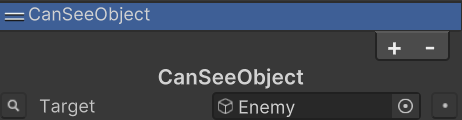
As you are testing you find that everything is working well and now you’d like to make a prefab out of it so you can have multiple agents in your scene. As soon as you make the agent a prefab and remove it from the scene you’ll find that the Enemy reference has gone missing. The reason this occurs is because as a project level asset (the prefab, subtrees, or project variables) cannot reference objects in the scene. This is a Unity restriction and the way to overcome it is to populate the variable at runtime.
The scene reference object can be populated at runtime in many different ways:
- Add a task to your behavior tree which searches for the object. This can be done with something as basic as the GameObject.Find method or your own retrieval system.
- Add the Behavior Tree component to your scene and use Variable Overrides to override the subtree variable value.
- Assign the variable value through your own initialization script.
The Runtime Behavior and Subtrees sample scenes shows an example of using overrides. Each method has their own advantages and disadvantages so there’s no one right way to assign the scene value.