Understand Actions

Actions do work. They can finish immediately, remain running over several updates, or fail when the requested work cannot be completed. Examples include waiting, moving toward a target, changing a variable, and sending an event.

Choose a task layout

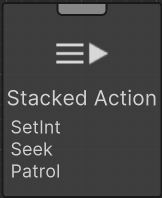
Most small GameObject Actions can share one Stacked Action node. A standalone Action gets its own node when its timing, connections, or configuration should remain visually separate. See Stacked Action for the complete editor workflow.

Control Actions with Conditionals

Actions are not reevaluated by Conditional Aborts. Put the changing question in a Conditional, then use that Conditional to control when an Action branch starts or stops.

Browse the built-in Actions

The illustrated guides remain visible in the menu. The compact reference below covers every other built-in Action without creating hundreds of description-only pages.

Quick reference

Description-only tasks are collected here so you can compare them without opening hundreds of separate menu entries. Search this page with your browser, or use the Behavior Tasks selector in the editor to filter by task name and capability.

Task Description
Abs Float Calculates the absolute value of a float.
Acos Float Calculates the arc cosine (inverse cosine) of a value. Returns angle in radians.
Add Element Adds the element to the list.
Add Game Object To Array Adds the GameObject to the array.
Add Game Object To List Adds the GameObject to the list.
Align To Surface Aligns the Transform to a surface normal using raycasting. Returns Success when aligned.
Angle To Direction Converts an angle (in degrees) to a Vector2 direction.
Animate Parameter Over Time Animates a parameter value over time with easing curves.
Animation Crossfade Crossfades between animations on the Animation component. Optionally waits until the animation completes.
Animation Play Plays an animation on the Animation component. Optionally waits until the animation completes.
Animator Crossfade Crossfades between animations with duration, layer, and normalized time control. Optionally waits until the animation completes.
Animator Play Plays an animation on the Animator component. Optionally waits until the animation completes.
Application Quit Quits the application.
Apply Explosion Force Applies explosion force with radius, upward modifier, and force mode.
Apply Force At Position Applies force at specific position with mode and optional relative direction.
Apply Force With Mode Applies force to Rigidbody with mode selection and optional relative direction.
Apply Force2 D Applies force to Rigidbody2D with mode selection and optional relative direction.
Apply Torque2 D Applies torque (rotational force) to Rigidbody2D with mode selection.
Asin Float Calculates the arc sine (inverse sine) of a value. Returns angle in radians.
Atan Float Calculates the arc tangent (inverse tangent) of a value. Returns angle in radians.
Atan2 Float Calculates the arc tangent of y/x. Returns angle in radians. Useful for converting direction to angle.
Audio Source Pool Manages audio source pooling with automatic cleanup.
Blend Blends animations with weight control and optional time offset.
Bool Flip Flips the value of the boolean.
Bool Operator Performs a math operation on the two booleans.
Bounce Between Points Bounces the Transform between two points. Returns Success when bounce count is reached (or runs continuously if infinite).
Break Pauses the editor when executed. Equivalent to setting a breakpoint. Only works in the Unity Editor.
Burst Emits one particle burst when Cycles is positive, then returns Success. The current task ends on its first update, so additional timed cycles do not run. Use separate bursts and waits for a sequence.
Calculate Path Calculates NavMesh path with distance and corner count.
Camera Look At With Constraints Looks at target with rotation constraints and smoothing.
Cast Shape Performs box/sphere/capsule cast with direction, distance, and hit detection.
Ceil Float Rounds a float up to the nearest integer.
Check Ground Checks ground beneath CharacterController with distance, normal, and surface detection.
Clamp Float Clamps a float value between a minimum and maximum value.
Clamp01 Float Clamps a float value between 0 and 1.
Clear Clears all elements from the list.
Clone Game Object Clones a GameObject with optional position offset, rotation offset, scale multiplier, and component copying.
Compare Float Compares two float values. Returns -1 if first is less, 0 if equal, 1 if first is greater.
Compare Tag And Layer Compares GameObject tag and layer with multiple conditions.
Concatenate String Concatenate two strings and store the result.
Convert Bool To Float Converts a boolean value to a float value (true = 1.0, false = 0.0).
Convert Bool To Int Converts a boolean value to an integer value (true = 1, false = 0).
Convert Bool To String Converts a boolean value to a string value.
Convert Color To Vector3 Converts a Color to a Vector3 (R, G, B components, alpha is dropped).
Convert Color To Vector4 Converts a Color to a Vector4 (R, G, B, A components).
Convert Component To Game Object Gets the GameObject from a Component.
Convert Float To Bool Converts a float value to a boolean value (0.0 = false, non-zero = true).
Convert Float To Int Converts a float value to an integer value.
Convert Float To String Converts a float value to a string value.
Convert Float To Vector2 Converts a float to a Vector2 by setting X, Y, or both components to the float value.
Convert Float To Vector3 Converts a float to a Vector3 by setting X, Y, Z, or all components to the float value.
Convert Game Object To Transform Converts a GameObject value to a Transform value.
Convert Int To Bool Converts an integer value to a boolean value (0 = false, non-zero = true).
Convert Int To Float Converts an integer value to a float value.
Convert Int To String Converts an integer value to a string value.
Convert Int To Vector2 Converts an int to a Vector2 by setting X, Y, or both components to the int value.
Convert Int To Vector3 Converts an int to a Vector3 by setting X, Y, Z, or all components to the int value.
Convert Quaternion To Float Converts a Quaternion to a float. Can extract X, Y, Z, W, or angle around an axis.
Convert Quaternion To Vector3 Converts a Quaternion to a Vector3. Can extract Euler angles or direction vectors (Forward, Right, Up).
Convert Quaternion To Vector4 Converts a Quaternion to a Vector4 (X, Y, Z, W components).
Convert String To Bool Converts a string value to a boolean value.
Convert String To Float Converts a string value to a float value.
Convert String To Int Converts a string value to an integer value.
Convert Transform To Game Object Converts a Transform value to a GameObject value.
Convert Vector2 To Float Converts a Vector2 to a float value. Can extract magnitude, squared magnitude, X, or Y component.
Convert Vector2 To Vector2 Int Converts a Vector2 to a Vector2Int by rounding each component to the nearest integer.
Convert Vector2 To Vector3 Converts a Vector2 to a Vector3. The Z component can be specified.
Convert Vector3 To Color Converts a Vector3 to a Color (X=R, Y=G, Z=B), using the configured Alpha value, which defaults to 1.
Convert Vector3 To Float Converts a Vector3 to a float value. Can extract magnitude, squared magnitude, X, Y, or Z component.
Convert Vector3 To Quaternion Converts a Vector3 to a Quaternion. Can use LookRotation (direction to rotation) or Euler angles.
Convert Vector3 To Vector2 Converts a Vector3 to a Vector2 by dropping one component (X, Y, or Z).
Convert Vector3 To Vector3 Int Converts a Vector3 to a Vector3Int by rounding each component to the nearest integer.
Convert Vector4 To Color Converts a Vector4 to a Color (X=R, Y=G, Z=B, W=A).
Copy Transform Copies transform values (position, rotation, scale) from another Transform. Can be instant or smooth.
Cos Float Calculates the cosine of an angle in radians.
Counter Increments or decrements a counter and finishes when the threshold is reached.
Crossfade Audio Crossfades between two audio sources with duration and volume control.
Delete Player Prefs Key Deletes a PlayerPrefs key.
Deserialize From Player Prefs Retrieves a stored string from PlayerPrefs and reports whether it is nonempty. Despite its name, this task does not deserialize an object or validate its type; parse and validate the returned text separately.
Destroy Destroys a GameObject after a delay. Can optionally release pooled objects back to their pool instead of destroying them.
Detect Collisions Detects CharacterController collisions with filtering, tag/layer checks, and collision reporting.
Direction To Angle Converts a Vector2 direction to an angle in degrees.
Dont Destroy On Load Marks the target GameObject to persist across scenes.
Dont Destroy On Load Objects Marks multiple GameObjects to persist across scenes.
Drag Control Sets linear and angular drag immediately with Transition Duration set to 0. A positive duration performs only one interpolation step before Success; it does not complete a timed transition.
Draw Line Draws a line between two points in the Scene view. Only visible in the editor or when Gizmos are enabled.
Draw Ray Draws a ray from a position in a direction in the Scene view. Only visible in the editor or when Gizmos are enabled.
Enable Disable Enables or disables the CharacterController when Smooth Transition is off. The smooth path performs one height-interpolation step and returns Success, potentially before changing enabled state; use the immediate mode for a complete toggle.
Fade Fades particle system in/out with duration control.
Fade In Out Fades a GameObject in or out using CanvasGroup or Renderer alpha. Returns Success when fade is complete.
Fade Material Alpha Fades material alpha with duration and optional shader property name.
Find Game Object By Name Finds a GameObject by name with search scope options (children, parent, scene, siblings). Can include inactive GameObjects and search recursively.
Find Game Object By Tag Finds GameObject(s) by tag. Can find closest to a position, find all with tag, or search in children only.
Find Game Object By Tag And Layer Finds GameObjects matching both tag and layer mask.
Find Game Object By Type Finds GameObject(s) that have a specific component type. Can find closest to a position, find all with type, or search in children only.
Float Operator Performs a math operation on the two floats.
Floor Float Rounds a float down to the nearest integer.
Follow Path Follows a path of waypoints. Returns Success when the path is complete.
Follow Path2 D Follows waypoints with Rigidbody2D force and rotation toward the current segment. It performs no obstacle-avoidance query. Returns Success when the path completes.
Follow Target Follows a target GameObject with configurable distance, offset, and smoothing. Can optionally look at the target.
Freeze Constraints Immediately assigns Rigidbody position/rotation constraint flags. There is no timed or smooth transition.
Game Object Move In Direction Moves the Transform in a direction with acceleration.
Game Object Set Enabled Enables or disables the specified component.
Get Bool Variable Gets the value of a bool SharedVariable by name.
Get Bounds Gets CharacterController bounds (center, extents, min, max, size) with world/local space options.
Get Child By Index Gets a child GameObject by index with bounds checking. Supports negative indices (e.g., -1 for last child).
Get Child By Name Gets a child GameObject by name. Can search recursively and use partial name matching.
Get Children Gets all children of a GameObject and stores them in a list.
Get Color Variable Gets the value of a Color SharedVariable by name.
Get Component Gets a component from a GameObject using the string component type name.
Get Component In Children Gets a component from a GameObject’s children using the string component type name.
Get Component In Parent Gets a component from a GameObject’s parent hierarchy using the string component type name.
Get Count Gets the count of elements in the list.
Get Element Selects the element from the list.
Get Element Index Gets the index of the element within the list.
Get Float Variable Gets the value of a float SharedVariable by name.
Get Game Object Index In Array Gets the index of the specified GameObject within the array. Returns -1 if not found.
Get Game Object Variable Gets the value of a GameObject SharedVariable by name.
Get Int Variable Gets the value of an int SharedVariable by name.
Get Layer Name Gets layer name from layer index with validation.
Get List Variable Gets the value of a list SharedVariable by name.
Get Mouse Position Gets the mouse position in screen coordinates.
Get Or Add Component Gets a component from a GameObject, or adds it if it does not exist. Outputs the requested Component reference.
Get Parent Game Object Gets the parent GameObject from a GameObject or Transform. Can traverse up multiple levels.
Get Parent Transform Gets the parent Transform from a GameObject or Transform. Can traverse up multiple levels.
Get Player Prefs Float Gets a PlayerPrefs float value.
Get Player Prefs Int Gets a PlayerPrefs integer value.
Get Player Prefs String Gets a PlayerPrefs string value.
Get Resource Path Gets resource path with validation.
Get Root Game Object Gets the root GameObject (topmost parent) from a GameObject or Transform.
Get Root Transform Gets the root Transform (topmost parent) from a GameObject or Transform.
Get State Gets CharacterController state (grounded, velocity, bounds, properties) with validation.
Get String Variable Gets the value of a string SharedVariable by name.
Get Transform Variable Gets the value of a Transform SharedVariable by name.
Get Vector2 Variable Gets the value of a Vector2 SharedVariable by name.
Get Vector3 Variable Gets the value of a Vector3 SharedVariable by name.
Get Vector4 Variable Gets the value of a Vector4 SharedVariable by name.
Idle Returns a TaskStatus of running. The task will only stop when interrupted or a conditional abort is triggered.
Ignore Collision Sets whether two colliders ignore each other. The current task ends on its first update, so a positive Duration does not reliably restore collisions later. Use duration 0, then a separate Wait and an explicit opposite setting when restoration is needed.
Impulse Applies impulse with direction, force, and optional relative space.
Insert Element Inserts the element at the specified list index.
Instantiate Instantiates a GameObject prefab with configurable delay, position, rotation, scale (or prefab scale), and parent. Can optionally auto-destroy after a duration.
Int Operator Performs a math operation on the two integers.
Invoke Unity Event Invokes a UnityEvent and returns success.
Lerp Float Linearly interpolates between two float values based on a t value (0 to 1).
Lerp Transform Linearly interpolates the Transform between two Transforms based on a t value (0 to 1). Returns Success when t >= 1.
Load Additive Scenes Loads multiple scenes additively with progress tracking.
Load JSON Data Reads a file as text and reports whether the read succeeded. The output is unparsed JSON text; parsing and type validation are the caller’s responsibility.
Load Multiple Resources Loads multiple resources with progress tracking.
Load Player Prefs Multiple Loads multiple PlayerPrefs values with default value fallback.
Load Resource Async Loads resource asynchronously with progress tracking.
Load Resource With Fallback Loads an untyped resource by path, then tries the fallback path when the first result is null. A nonnull result indicates success; the task does not validate an expected resource type.
Load Scene Async With Progress Loads scene asynchronously with progress tracking and activation control.
Log A simple task which will output the specified text and return success. It can be used for debugging.
Match Transform Smoothly matches another Transform’s position, rotation, and/or scale. Returns Success when matched.
Material Control Sets physics material properties (friction, bounciness, combine mode).
Material Property Animation Animates material property with easing curves.
Max Vector2 Returns the component-wise maximum of two Vector2 values.
Max Vector3 Returns the component-wise maximum of two Vector3 values.
Min Vector2 Returns the component-wise minimum of two Vector2 values.
Min Vector3 Returns the component-wise minimum of two Vector3 values.
Mouse Raycast Casts a ray from the mouse position through the camera into the world to detect objects.
Move Moves the character using the Unity CharacterController component based on the input vector. The x component controls horizontal movement and the y component controls forward movement.
Move To Parent Moves a GameObject to a new parent with optional smooth movement. Returns Success when moved.
Move Towards Float Moves a float value towards a target value by a maximum delta amount.
Move Towards2 D Moves Rigidbody2D towards target with force application and arrival detection.
Negate Float Negates a float value (multiplies by -1).
Obstacle Avoidance Controls obstacle avoidance with quality and radius settings.
Orbit Around Orbits the Transform around a target GameObject or position at a specified radius and speed.
Oscillate Position Oscillates the Transform’s position between two points using sine, cosine, or ping-pong oscillation.
Oscillate Rotation Oscillates the Transform’s rotation between two rotations using sine, cosine, or ping-pong oscillation.
Oscillate Scale Oscillates the Transform’s scale between two values using sine, cosine, or ping-pong oscillation.
Overlap Circle2 D Performs 2D overlap circle detection with layer mask, tag filter, and result processing.
Overlap Shape Performs box/sphere/capsule overlap check with layer mask, tag filter, and result collection.
Particles Set Velocity Sets particle velocity with mode selection and variation.
Patrol Uses the NavMeshAgent to patrol through a set of waypoints.
Perlin Noise2 D Generates 2D Perlin noise value at the specified coordinates.
Perlin Noise3 D Generates 3D Perlin noise value at the specified coordinates. Note: Unity’s Mathf.PerlinNoise only supports 2D, so this uses a workaround combining multiple 2D samples.
Physics Based Movement2 D Moves towards a target using physics forces with acceleration and deceleration curves. Returns Success when the target is reached.
Physics Set Velocity Sets Rigidbody velocity with interpolation speed and local-space selection. For explicit constraint handling, use Set Velocity With Constraints.
Ping Pong Float Ping-pongs a float value between 0 and a specified length.
Play Audio Sequence Attempts to start the first clip with its volume, then returns Success. The current implementation does not stay active to advance through later clips or delays; author separate playback and wait steps for a sequence.
Play Audio With Fade Plays audio clip with fade in/out, volume control, and optional looping.
Play Random Audio Plays random audio from array with pitch/volume variation.
Play With Parameters Plays particle system with emission rate, color, and lifetime control.
Pool Manages particle system pooling with automatic cleanup.
Preload Resources Preloads multiple resources with progress tracking.
Random Element Sets a random element value from the list.
Random Game Object From Array Sets a random GameObject value from the GameObject array.
Random Game Object From List Sets a random GameObject value from the GameObject list.
Random Inside Unit Circle Generates a random Vector2 inside a unit circle.
Random Inside Unit Sphere Generates a random Vector3 inside a unit sphere.
Random On Unit Circle Generates a random Vector2 on a unit circle (normalized).
Random On Unit Sphere Generates a random Vector3 on a unit sphere (normalized).
Random Vector2 Generates a random Vector2 value within a specified range.
Random Vector3 Generates a random Vector3 value within a specified range.
Rate Limiter The current implementation resets its timestamp on every start and succeeds on the first update. It does not enforce an interval across normal reentries. Use a persistent next-allowed timestamp and a Conditional for availability gating.
Raycast Performs a raycast with layer mask, tag filter, and hit result processing.
Raycast2 D Performs 2D raycast with layer mask, tag filter, and hit result processing.
Remove Element Removes the element from the list.
Remove Game Object From Array Removes the GameObject from the array.
Remove Game Object From List Removes the GameObject from the list.
Reparent Children Reparents all children from a source GameObject to a new parent. Can filter by name pattern or tag, and maintain world positions.
Restart Behavior Tree Restarts the specified behavior tree.
Return Status The return status task will immediately return sucess or failure.
Rigidbody Move Towards Moves Rigidbody towards target with force application and arrival detection.
Rotate Rotates the Transform based on a Vector2 input. The x component controls yaw (horizontal rotation) and the y component controls pitch (vertical rotation).
Rotate Axis Rotates the Transform around a specified axis (X, Y, or Z) based on a float input value. Useful for character rotation (Y axis) or camera panning (X axis).
Rotate Towards Rotates the Transform to face a direction or a GameObject. If a GameObject is supplied, the direction is from this transform towards the target’s position. Returns Success when aligned.
Round Float Rounds a float to the nearest integer.
Round To Nearest Float Rounds a float to the nearest multiple of a specified value.
Save JSON Data Saves data to JSON file with path validation and error handling.
Save Player Prefs Multiple Saves multiple PlayerPrefs values (int, float, string) in one action.
Scale Over Time Scales the Transform to a target scale over time. Returns Success when scaled.
Scene Transition Manages scene transition with fade/loading screen and progress.
Screen To World Point Converts a screen position to a world position using the camera.
Select Game Object From Array Selects the GameObject from the array.
Select Game Object From List Selects the GameObject from the list.
Send Event Sends an event to the behavior tree, returns success after sending the event.
Serialize To Player Prefs Stores the supplied string in PlayerPrefs under a prefixed key. Serialize an object before passing its text to this task; the task does not serialize objects itself.
Set Active Sets a GameObject active or inactive after a delay. Returns Success when the state is changed.
Set Active Scene Sets the active scene after validation and writes the boolean Scene Set Active Shared Variable result. It has no callback input.
Set Agent Speed Sets agent speed with smooth transition and acceleration.
Set Angular Velocity Sets angular velocity with constraint checking.
Set Animation Speed Sets Animation speed immediately or interpolates it linearly over the configured duration. It has no curve input.
Set Bool Set the boolean value.
Set Bool Variable Sets the value of a bool SharedVariable by name.
Set Clipping Planes Sets camera near/far clipping planes with smooth transition.
Set Collision Layers Sets CharacterController collision detection layers (include/exclude) with validation.
Set Color Set the Color value.
Set Color Over Time Changes particle color over time with gradient support.
Set Color Variable Sets the value of a Color SharedVariable by name.
Set Constraints Sets Rigidbody constraints with freeze position/rotation and interpolation mode.
Set Destination Sets NavMesh destination with path validation and arrival detection.
Set Element Sets the element at the specified list index.
Set Emission Rate Sets particle emission rate immediately with Transition Duration 0. A positive duration performs one interpolation step and returns Success, leaving the timed transition incomplete.
Set Enabled Fade Enables/disables renderer with optional fade transition.
Set Field Of View Sets camera FOV with smooth transition and optional curve.
Set Float Set the float value.
Set Float Variable Sets the value of a float SharedVariable by name.
Set Frame Rate Sets the target frame rate immediately with Transition Duration 0. A positive duration performs one interpolation step and returns Success; it does not run the full transition.
Set Game Object Variable Sets the value of a GameObject SharedVariable by name.
Set Gravity Sets global gravity immediately with Transition Duration 0. Local mode disables built-in gravity and applies a single acceleration force; it does not provide continuous local gravity. A positive duration performs only one interpolation step before Success.
Set Int Set the integer value.
Set Int Variable Sets the value of an int SharedVariable by name.
Set Light Properties Sets light type and range immediately. With Transition Duration 0, also sets color and intensity immediately; a positive duration performs only one color/intensity interpolation step before Success.
Set List Variable Sets the value of a list SharedVariable by name.
Set Mass Sets mass immediately with Transition Duration 0 and assigns the center-of-mass offset. A positive duration performs only one mass-interpolation step before Success.
Set Material Property Over Time Changes material property (color, float, vector) over time with curve.
Set Material Texture Sets material texture with optional tiling and offset.
Set Mixer Group Sets audio source to mixer group with volume and pitch control.
Set Parameters Sets multiple animator parameters (float, int, bool, trigger) with validation.
Set Player Prefs Float Sets a PlayerPrefs float value.
Set Player Prefs Int Sets a PlayerPrefs integer value.
Set Player Prefs String Sets a PlayerPrefs string value.
Set Properties Sets CharacterController height, radius, center, slope limit, and step offset. Use Transition Duration 0 to apply all values immediately; a positive duration performs only one height/radius/center interpolation step before Success.
Set Render Queue Sets material render queue with validation.
Set Rigidbody2 D Properties Sets multiple Rigidbody2D properties including mass, drag, angular drag, gravity scale, and constraints.
Set Shadow Settings Sets a Renderer’s shadow-casting mode and whether it receives shadows. It does not configure light shadow strength or resolution.
Set State Calls Animator.Play for the state name/hash and layer. The field labeled Transition Duration is passed as normalized start time: 0.5 starts halfway through the state. It does not set a crossfade duration; use Animator Crossfade for a transition.
Set String Set the string value.
Set String Variable Sets the value of a string SharedVariable by name.
Set Subtree Sets the specified subtree.
Set Tag And Layer Sets the tag and layer for the GameObject.
Set Time Scale Sets time scale with smooth transition and duration.
Set Transform Set the Transform value.
Set Transform From Components Sets the Transform’s position, rotation, and/or scale from separate component values. Only updates specified components.
Set Transform Variable Sets the value of a Transform SharedVariable by name.
Set Vector2 Set the Vector2 value.
Set Vector2 Variable Sets the value of a Vector2 SharedVariable by name.
Set Vector3 Set the Vector3 value.
Set Vector3 Variable Sets the value of a Vector3 SharedVariable by name.
Set Vector4 Set the Vector4 value.
Set Vector4 Variable Sets the value of a Vector4 SharedVariable by name.
Set Velocity With Constraints Sets velocity with constraint checking and smooth interpolation.
Set Velocity2 D Sets Rigidbody2D velocity with smooth interpolation and optional constraints.
Set Viewport Sets camera viewport rect with smooth transition.
Shake Shakes the camera using intensity, duration, and frequency, with fixed linear intensity decay and sinusoidal modulation. It has no configurable curve.
Shared Wait Wait a specified amount of time. The task will return running until the task is done waiting. It will return success after the wait time has elapsed. Uses the GameObject workflow.
Sign Float Returns -1 for a negative float and 1 for a nonnegative float, including zero.
Signed Angle Calculates the signed angle (in degrees) between two Vector3 values. Returns negative for clockwise, positive for counter-clockwise.
Sin Float Calculates the sine of an angle in radians.
Slow Motion Effect Creates slow motion effect with time scale and duration.
Smooth Camera Follow Smoothly follows target with offset, damping, and look-ahead.
Smooth Damp Float Smoothly dampens a float value towards a target value over time.
Smooth Look At Smoothly rotates the Transform to look at a target GameObject or position. Returns Success when aligned.
Smooth Move To Smoothly moves the Transform to a target position with acceleration and deceleration. Returns Success when arrived.
Spatial Audio Control Controls 3D audio positioning, min/max distance, and spatial blend.
Spawn At Position Spawns a GameObject prefab at a specified position with full configuration. Can optionally auto-destroy after a duration.
Sqrt Float Calculates the square root of a float value.
Start Behavior Tree Starts the specified behavior tree.
Stop Behavior Tree Stops the specified behavior tree.
Subtree Reference Loads the specified subtrees in at runtime.
Subtree Reference Selector Selects a subtree based on the index value.
Sync Animator Layers Synchronizes multiple animator layers with weight and time control.
Tan Float Calculates the tangent of an angle in radians.
Teleport Teleports CharacterController to position with validation, ground snapping, and rotation.
Time Based Delay Delays action based on unscaled time (works during pause).
Time Scale Curve Changes time scale over time using animation curve.
Toggle Active Toggles a GameObject’s active state. Can optionally delay the toggle. Returns Success when toggled.
Trail Control Controls particle trail with width, color, and lifetime.
Transform Look At With Constraints Looks at a target GameObject or position with pitch and yaw angle constraints.
Transform Move In Direction Moves the Transform in a direction with acceleration.
Transform Move Towards Move towards the target position using Vector3.MoveTowards. The object can pass through walls with this action. The position can either be specified by a transform or position. If the transform is specified then the position will not be used.
Transition Transitions between positions/rotations with duration and easing.
Unity Objects Set Enabled This task is obsolete. Use Game Object Set Enabled (GameObject.SetEnabled) to enable or disable the component.
Unity Objects Set Game Object This task is obsolete. Use Variables.SetGameObject instead.
Unload Scene Async Unloads scene asynchronously with progress tracking.
Unload Unused Assets Unloads unused assets with progress callback.
Variables Set Game Object Set the GameObject value.
Vector2 Angle Calculates the angle (in degrees) between two Vector2 values.
Vector2 Distance Calculates the distance between two Vector2 points.
Vector2 Dot Calculates the dot product of two Vector2 values.
Vector2 Int Operator Performs a component-wise arithmetic operation on two Vector2Int values.
Vector2 Lerp Linearly interpolates between two Vector2 values based on a t value (0 to 1).
Vector2 Magnitude Calculates the magnitude (length) of a Vector2.
Vector2 Normalized Returns the normalized (unit length) version of a Vector2.
Vector2 Project Projects a Vector2 onto another Vector2.
Vector2 Reflect Reflects a Vector2 off a normal vector.
Vector2 Rotate Rotates a Vector2 by an angle in degrees.
Vector2 Scale Scales a Vector2 by another Vector2 (component-wise multiplication).
Vector2 Slerp Spherically interpolates between two Vector2 values based on a t value (0 to 1).
Vector2 Sqr Distance Calculates the squared distance between two Vector2 points. Faster than distance (no square root).
Vector3 Angle Calculates the angle (in degrees) between two Vector3 values.
Vector3 Cross Calculates the cross product of two Vector3 values.
Vector3 Distance Calculates the distance between two Vector3 points.
Vector3 Dot Calculates the dot product of two Vector3 values.
Vector3 Int Operator Performs a component-wise arithmetic operation on two Vector3Int values.
Vector3 Lerp Linearly interpolates between two Vector3 values based on a t value (0 to 1).
Vector3 Magnitude Calculates the magnitude (length) of a Vector3.
Vector3 Normalized Returns the normalized (unit length) version of a Vector3.
Vector3 Project Projects a Vector3 onto another Vector3.
Vector3 Reflect Reflects a Vector3 off a normal vector.
Vector3 Rotate Rotates a Vector3 around an axis by an angle in degrees.
Vector3 Scale Scales a Vector3 by another Vector3 (component-wise multiplication).
Vector3 Slerp Spherically interpolates between two Vector3 values based on a t value (0 to 1).
Vector3 Sqr Distance Calculates the squared distance between two Vector3 points. Faster than distance (no square root).
Vector4 Operator Performs a component-wise arithmetic operation on two Vector4 values.
Volume Over Time Smoothly changes audio volume over time with curve support.
Wait Wait a specified amount of time. The task will return running until the task is done waiting. It will return success after the wait time has elapsed.
Wait For Animation Waits until an animation completes. The action will return running until the animation finishes playing.
Wait For Animator State Returns success as soon as the current Animator state ends.
World To Screen Point Converts a world position to a screen position using the camera.
Zoom Zooms camera with smooth interpolation and bounds checking.