Playmaker
Playmaker is a popular visual scripting tool which allows you to easily create finite state machines. Behavior Designer integrates directly with Playmaker by allowing Playmaker to carry out the action or conditional tasks and then resume the behavior tree from where it left off. Playmaker integration files are located on the downloads page. Once those files are imported you are ready to start creating behavior trees with Playmaker.
There are two different methods for interacting with Playmaker. A demo scene has been included in the Playmaker integration package showing both of these methods.
Start FSM
The most common scenario is to start a FSM from your behavior tree. This will allow you to use Playmaker to control the logic while Behavior Designer controls the flow. The first step is to add the StartFSM task to your behavior tree when you want to run Playmaker:
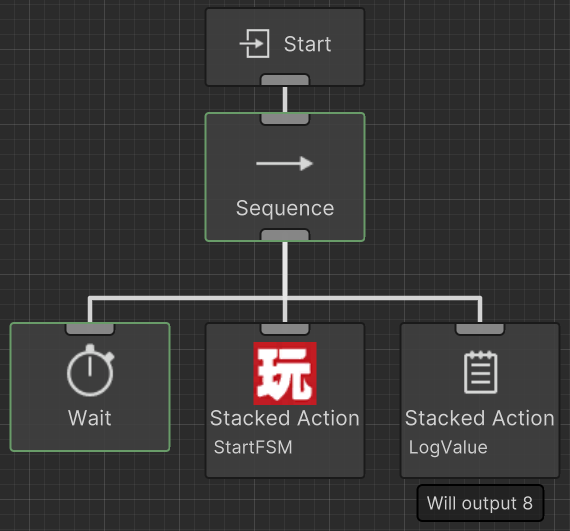
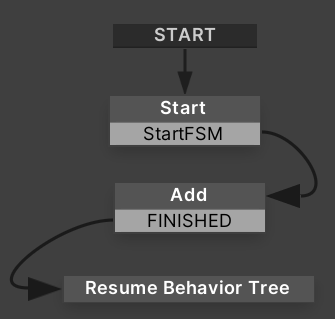
This task will send a Playmaker event in order to start the FSM. Within your FSM you should have the event specified within the task. On the StartFSM task if you enable Wait for Completion then Behavior Designer will wait until the ResumeBehaviorTree action has been executed. Variables can also be synchronized to and from Playmaker.
Start Behavior Tree
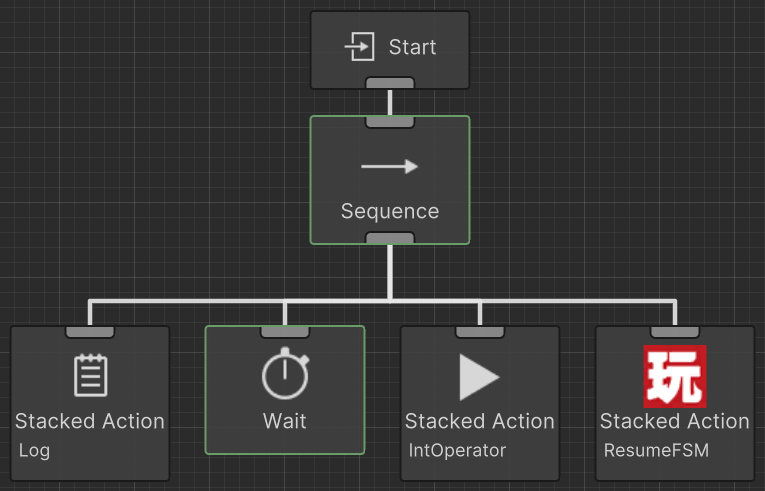
You can also start a behavior tree from your FSM with a similar method as above. Within your FSM you should add the StartBehaviorTree action in order to start the Behavior Designer tree. Ensure the Behavior Tree component is disabled as Behavior Designer starts the Start branch.
Within your behavior tree you can then use the ResumeFSM task in order to resume the FSM after traversing the behavior tree. Variables can also be synchronized to and from Behavior Designer.