Scope
Within the State Designer editor under the Shared Variables pane you’ll notice that there are four different tabs indicating where you can save your variable.
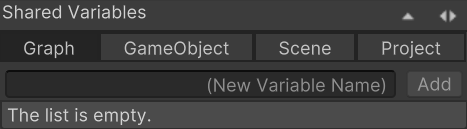
The four locations are:
- Graph: Variables stored local to the graph. This can be considered a local variable and likely will be where most of your variables are stored.
- GameObject: Variables stored on the GameObjectSharedVariables component that is on the same GameObject as your state machine. Any state machine on that GameObject can access the variables stored within this scope.
- Scene: Variables stored on the SceneSharedVariables component within the scene. Any state machine within that scene can access the variables stored within this scope.
- Project: Variables stored within the ProjectSharedVariables ScriptableObject. Any state machine within the project can access the variables stored within this scope. By default this ScriptableObject is created within the Assets/Opsive/GraphDesigner/Resources/ProjectSharedVariables path. This file can be moved as long as it is stored within a Resources folder.
Dynamic Variables
There is a fifth scope level that is not visible within the Shared Variables pane: the Dynamic Variable. Dynamic variables allow you to create temporary variables that are very limited. These variables are great if you want to share data between a limited number of tasks and do not need to access the variable outside of those tasks. Dynamic variables can be created by clicking the circle to the right of the variables field and then selecting “(Dynamic)”:
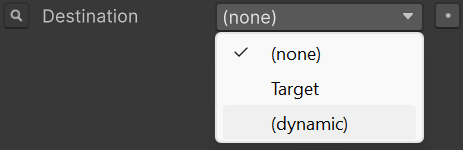
After the dynamic variable has been created you can then type the name of the variable.

The dynamic variable will have the same value for any fields that reference the same dynamic variable name. The name is case sensitive and should not be the same as a variable within the tree. The type of the dynamic variable is determined at runtime and this type should be consistent across all dynamic variables with the same name.