
What is a Finite State Machine?
Export
A finite state machine organizes behavior into clear modes and defines exactly when the system can move from one mode to another. After reading this page, you should be able to identify a state, transition, and condition, then follow the active path through a simple graph.
Watch the finite state machine tutorial on YouTube.
Understand the parts
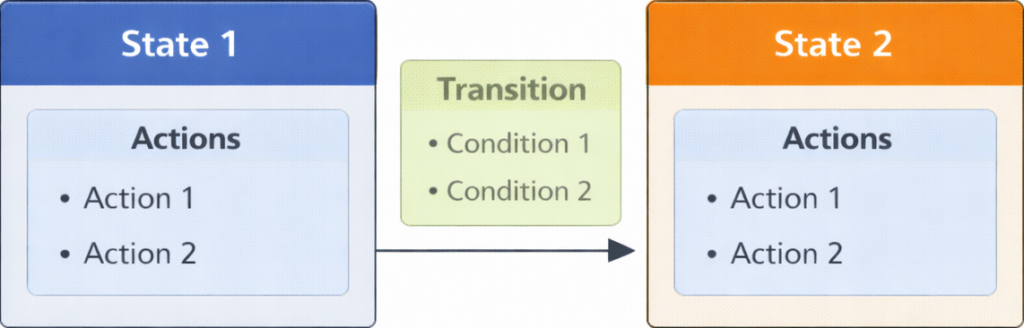
A finite state machine is built from a small set of parts:
- A state is the mode that is currently active, such as Patrol, Chase, or Attack.
- An Action performs the work associated with the active state.
- A transition connects one state to another.
- A Condition decides when its transition is allowed to run.
At any moment, the state machine has a well-defined active state. It remains there until a transition’s conditions are satisfied, then exits the current state and enters the connected state.
Follow one enemy scenario

Consider an enemy with Patrol, Chase, and Attack states. It starts in Patrol. Detecting the player satisfies the condition that leads to Chase; reaching the player allows the transition to Attack. If the player escapes, another transition returns the enemy to Patrol.
Each state gives the enemy one clear mode, while the transitions show every permitted change. You can understand the possible flow without combining all of the movement, detection, and attack rules into one block of logic.
The same graph can grow without changing its basic model. For example, add a Flee state and connect it with a low-health condition:

Flee is another mode, and the low-health check is another reason to transition. The existing Patrol, Chase, and Attack responsibilities remain distinct.
How it runs
- The state machine enters its starting state.
- The active state’s Actions perform their work.
- The state machine evaluates the Conditions on transitions leaving that state.
- When a transition is allowed, the current state exits and the connected state becomes active.
- The same process repeats from the new state.

In Play Mode, State Designer highlights the active state and shows transitions as they occur. This lets you compare the graph’s visible flow with the behavior you observe in the game.
Choose a finite state machine when modes matter
Finite state machines are a good fit when behavior has stable modes, explicit changes, or clear phases. Common uses include animation control, gameplay modes, boss fight progression, and user-interface flow.
Start with a small graph whose states have clear responsibilities. Add a new state when the system needs a genuinely different mode, and add a transition when you can name the condition that permits that change.
Related:
- Learn how States organize each behavior mode.
- Learn how Actions perform work in the active state.
- Learn how Conditions control transitions.
- Build your first graph with Getting Started.
- Cross-product comparison: Finite State Machines vs Behavior Trees explains when State Designer or Behavior Designer is the clearer structure.