Assign a scene object at runtime when a reusable prefab, Subgraph, or Project variable needs to work with an object from the current scene. This commonly applies to targets, managers, spawn points, cameras, and other references that differ between scenes or agent instances.

In the editor

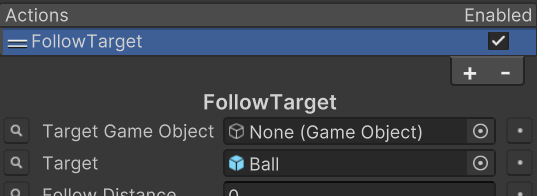
While testing a scene instance, an Action or Shared Variable can reference a scene object directly. In this example, the FollowTarget Action uses the Ball GameObject as its Target.

The FollowTarget Action Inspector with the Ball GameObject assigned to its Target field.

The direct reference cannot remain when the agent or graph is stored as a project-level asset. Unity does not allow prefabs, Subgraphs, or Project variables to serialize references to objects that exist only in a scene.

Set up the reference

  1. Create a GameObject Shared Variable for the scene object.
  2. Assign that Shared Variable to each State or Action field that needs the object.
  3. Test the graph with a scene object assigned directly.
  4. Before reusing the graph from a prefab or Subgraph, choose how the scene value will be supplied at runtime.

Use one of these supported approaches:

  • Add an Action that finds the object with GameObject.Find or the project’s own retrieval system.
  • Place the State Machine component in the scene and use a Subgraph Reference override to supply the scene value to a reusable Subgraph.
  • Assign the Shared Variable from an initialization script.

There is no single required approach. Choose the one that best matches how the project creates agents and owns scene references.

How it runs

A reusable prefab or Subgraph stores its graph data without a direct scene-object reference, and a Project variable also cannot hold that scene reference. At runtime, the selected setup resolves the scene object and assigns it to the Shared Variable. States and Actions that reference that same variable then receive the resolved object.

Verify the reference

  1. Create or instantiate the reusable agent in the scene.
  2. Run the initialization, override, or lookup that assigns the target.
  3. Confirm in Play Mode that the Shared Variable contains the expected scene object.
  4. Confirm that the FollowTarget Action follows the assigned object rather than reporting a missing reference.

Supported caveats

  • A direct scene reference can work while testing a scene instance and then disappear when the object becomes a prefab or another project-level asset.
  • Prefabs, Subgraphs, and Project variables cannot serialize scene-object references because the referenced object belongs to a scene.
  • Runtime assignment must occur before a State or Action tries to use the value.