Action State
The Action State is the main state type you’ll use in a state machine for a GameObject workflow. It contains a list of actions and controls how those actions run. In most graphs, this is where the real work happens. You add actions to the state, configure them in the inspector, and let the state run those actions when it becomes active.
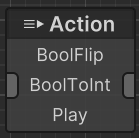
Execution Type
The Action State has an Execution Type setting that controls how its actions run:
- Sequence: Actions run one at a time in order. The state stays active until the current action finishes, then it moves to the next action, and the state finishes after the last action is done.
- Parallel: Actions start together. The state remains active while any action is still running, and it finishes only after all active actions are done.
This gives you an easy way to decide whether behavior should feel step-by-step or simultaneous.
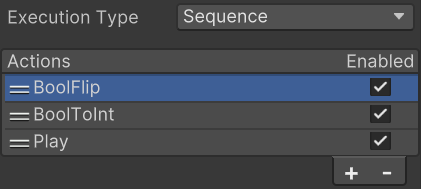
How Action State Works with Conditions and Transitions
Action States run actions, but they don’t decide transitions by themselves. Outgoing transitions still rely on conditions to decide when a transition is valid. That means Action State and conditions work together:
- The Action State handles what the character/object is doing right now.
- Conditions on outgoing transitions decide when to switch to another state.
Transition timing settings (like EvaluationMode) are configured on each transition, but they naturally interact with how the Action State is executing. For example, if a transition checks on state completion, then Sequence waits for the last action, while Parallel waits for all actions to complete.
Extending Action State Behavior
You usually don’t create a brand-new state type to add behavior. Instead, you create new actions and add them to an Action State. For custom authoring: