Node Views
Custom content can be added to the individual node view within the State Designer editor. This content is added through the StateNodeViewControl. As an example the Action States node displays the actions that are included in the node:
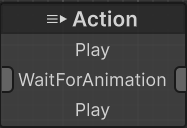
Node Views use the same Control Type system as that adds the type and attribute controls. There are some things to pay attention to within this control:
- When the view is attached to the panel it registers for the GraphEventType.WindowUpdate event. UIElements are persisted so by registering for the window update event we can be sure the progress bar will stay up to date as the time changes.
- Within UpdateWaitProgress the m_WaitComponentIndex is retrieved. The Wait task is an Entity task so the progress amount will be stored in an Entity component.
- The RuntimeIndex is used instead of the regular Index of the node. This is done because the RuntimeIndex may be different depending on the behavior tree branch structure.
If you are adding a Node View to a GameObject task you can just reference that task directly. AddNodeView would look something like:
public override void AddNodeView(GraphWindow graphWindow, VisualElement parent, object node)
{
    base.AddNodeView(graphWindow, parent, node);

    var playAnimation = node as PlayAnimation;
With this setup you have a reference to the PlayAnimation state directly and do not need to search based on the RuntimeIndex.