
Swim
The Swim ability will allow the character to traverse through water and is activated on collision with water layer triggers. The swim ability inherits the Detect Object Ability Base ability allowing for a broad range of water detection modes. It is recommended that the water uses a trigger setup.
Setup
- Select the + button in the ability list under the “Abilities” foldout of the Ultimate Character Locomotion component.
- Add the “Swimming Pack/Swim” ability. This ability should be positioned above the Fall ability but below the Dive and Climb from Water abilities.
- Perform the water setup.
- Set the Detect Object Ability Base parameters. In the demo scene Detect Layers is set to the Water layer.
- Set the Start Swim Depth, Surface Swim Depth, and the Surface Height Adjustment.
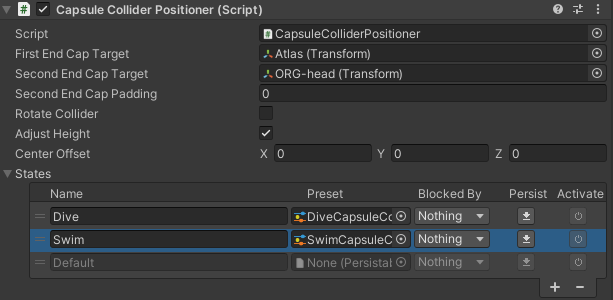
- Add the Swim Capsule Collider Positioner preset to the character’s Capsule Collider Positioner component. This component is located on the Character/Colliders/Capsule Collider GameObject. Ensure the Capsule Collider Positioner’s Rotation Bone and Position Bone fields are set to a Transform on the character. This can be set by enabling the Rotate Collider toggle.
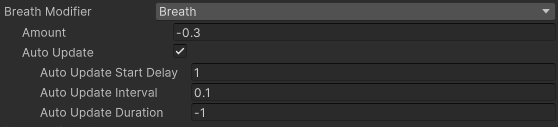
- Add the Breath attribute and Drown ability (if necessary).
- Specify any Water Effects.
API
The Swim ability can be started manually if the water object that you are using does not use a trigger. The TryStartStopSwim method can be used to start or stop the swim ability without a trigger. With this setup the water depth can be set with the SetWaterSurfacePosition method. The water depth should continuously be updated with the current swim depth.
using UnityEngine;
using Opsive.UltimateCharacterController.Character;
using Opsive.UltimateCharacterController.Character.Abilities;
using Opsive.UltimateCharacterController.AddOns.Swimming;

public class MyObject : MonoBehaviour
{
    [Tooltip("The character that contains the swim ability.")]
    [SerializeField] protected GameObject m_Character;

    private Swim m_SwimAbility;

    /// <summary>
    /// Starts the swim ability.
    /// </summary>
    private void Start()
    {
        var characterLocomotion = m_Character.GetComponent<UltimateCharacterLocomotion>();
        m_SwimAbility = characterLocomotion.GetAbility<Swim>();
        m_SwimAbility.TryStartStopSwim(true);
    }

    /// <summary>
    /// Starts the swim ability.
    /// </summary>
    private void Start()
    {
        m_SwimAbility.SetWaterSurfacePosition(5f);
    }
}
Inspected Fields
Start Swim Depth
The water depth that the character can start to swim at.
Surface Swim Depth
The water depth that the character should swim and the surface at.
Surface Height Adjustment
Modifies the default height that the character will swim on the surface at.
Can Swim Underwater
Can the character swim underwater?
Start Underwater Swim Pitch
Specifies the camera pitch that the character will transition from a surface swim to underwater swim.
Min Underwater Swim Depth
The minimum surface depth that the character can swim underwater.
Start Underwater Swim Name
The button mapping to start swimming underwater. An empty value will prevent the mapping from being used.
Surface Buoyancy Amount
The amount of buoyancy that should be applied to the character while underwater.
Underwater Buoyancy Amount
The amount of buoyancy that should be applied to the character while underwater.
Water Height Detection Mode
The percentage that the gravity force is retained each frame after the character enters the water.
Water Height Detection Mode
Specifies the method for detecting the water height:
- Collider: Detect the water height based on the collider above the character.
- Custom: A custom water height can be set with the SetWaterSurfacePosition method.
Breath Modifier
The breath attribute that should be modified when the character is underwater.
Entrance Splash
Effect that should play when the character enters the water from the air.
Surface Swim Splash
Effect that should play when the character is swimming on the surface.
Underwater Swim Movement
Effect that should play when the character is swimming underwater.
Underwater Bubbles
Effect that should play when the character is swimming underwater.
Underwater State Name
The state that should activate when the character is underwater.