
Ladder Climb
The LadderClimb ability allows the character to move up and down a ladder. The character can mount/dismount on the ladder from either direction and can mount while in the air.
Setup
- Select the + button in the ability list under the “Abilities” foldout of the Ultimate Character Locomotion component.
- Add the “Climbing Pack/Ladder Climb” ability. This ability should be positioned near the top of the list so it will override any abilities beneath it.
- Add any states to the components that should activate when Free Climb in active. In the demo scene the following states are added:
- The Airborne state added to the Ladder Climb ability.
- The LadderClimb state added to the Animator Monitor component.
- The LadderClimb state added to the Character IK component.
- The LadderClimb state added to the arm Third Person Object components (only used for first person).
- The LadderClimb state added to the Camera Controller (only used for first person).
- Setup the ladder object that the that the character should be able to climb on. The ladder should either be in the specified Layer Mask or contain the Object Identifier component with the specified Object ID. See the Detect Ground Ability Base class for more information on these parameters.
- Add the Ladder component to the ladder object that the character can climb on.
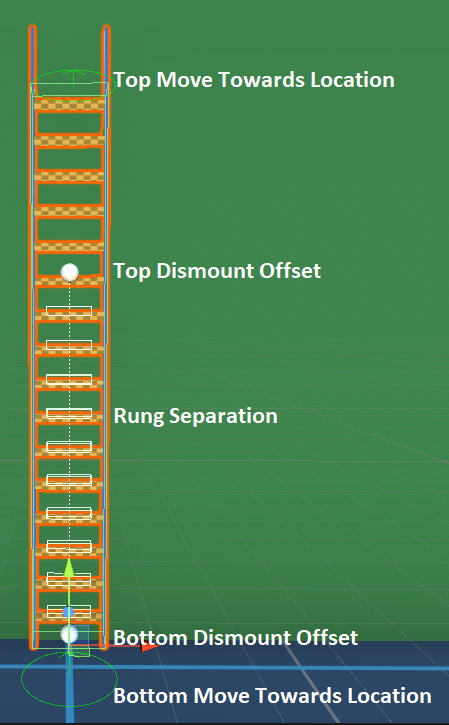
- A bottom and top Move Towards Location should be specified so the character can move into the correct location before mounting.
- The top and bottom dismount offset should be specified allowing the character to dismount in the correct location. These offsets are measured from the ladder’s pivot position.
- The rung offset and separation should be specified if the character can mount on the ladder while in the air.
Inspected Fields
Airborne Auto Start
Can the ability auto start when the character is airborne?
Draw Debug Lines
Should debug lines be drawn to the editor indicating the location of the horizontal and vertical casts?
Allowed Movements
Specifies which hang movements the character can perform.
- InAirMount: The character can mount while in the air.
- BottomDismount: The character can dismount on the bottom.
- TopDismount: The character can dismount on the top.
- StartFromHang: The character can start climbing from the Agility Pack Hang ability.
Airborne Move Towards Speed
Specifies the speed that the character moves towards the ladder if mounting in the air.
Stop Climb on Jump
Should the ability stop if the jump button is pressed?
Start Hang Offset
The offset used to check for a ladder if the hang ability is active.